Kit vs MailerLite: 40× the Free Tier, or Half the Price
These two tools are usually shortlisted together and they are almost perfect opposites. MailerLite is the cheaper one — roughly half Kit’s price at every list size we checked. Kit gives away forty times more for free.
That sounds like a contradiction and isn’t. They’re charging for different things. MailerLite meters capacity: you pay for the number of subscribers you hold and the volume you send, and every paid plan carries the full feature set. Kit meters capability: it will hold a very large list for nothing, and charges you for automation.
So the decision isn’t “which is cheaper”. It’s whether the thing you need is room or machinery, and there’s a point where the answer flips. This works out where.
All pricing was read off each vendor’s own calculator on 21 August 2026, on monthly billing, by moving the subscriber slider ourselves rather than quoting the default view.
We have no affiliate relationship with either tool here, and there are no affiliate links on this page. Other articles on Cevora do carry them — see our affiliate disclosure.
What we have and haven’t tested. We opened accounts on both while writing this, so the signup findings and the screenshots below are from our own dashboards. Where we describe pricing, it’s measured from each vendor’s calculator. We have not run either at scale with a real list, and we don’t write as though we had.
Price, at three list sizes
Monthly billing, entry-level paid plan:
| Subscribers | Kit (Creator) | MailerLite (Comfort) | Difference |
|---|---|---|---|
| 1,000 | $39 | $19 | Kit costs 2.1× |
| 5,000 | $89 | $49 | Kit costs 1.8× |
| 25,000 | $199 | $179 | Kit costs 1.1× |
Higher tiers, same sizes: Kit Pro $79 at 1,000 and $279 at 25,000. MailerLite Power $39 / $69 / $239.
MailerLite wins on price at every row, and the gap narrows as you grow — from more than double at 1,000 subscribers to about eleven percent at 25,000. If you are choosing purely on the invoice, this table ends the argument and you can stop reading.
Almost nobody should choose purely on the invoice, because of the next table.
The free tiers are not in the same category
| Free plan holds | What it excludes | |
|---|---|---|
| Kit | 10,000 subscribers | Automation beyond one basic visual sequence |
| MailerLite | 250 subscribers, 2,500 emails/month | Most of the platform |
Forty times the capacity. MailerLite’s free tier is an evaluation sandbox — 250 subscribers is a personal mailing list, not a business one. Kit’s is a plan you could run a newsletter on for years.
At 5,000 subscribers, Kit’s free plan is doing the job MailerLite charges $49 a month for. At 10,000 it’s doing the job MailerLite charges roughly $100 a month for. That is $600 to $1,200 a year of difference in Kit’s favour, for as long as you can work without automation.
It’s worth knowing exactly where the ceiling is, because Kit’s pricing page hides it well. Drag the slider past 10,000 and the free card still reads “$0 /mo” while the subscriber count climbs — but it’s greyed out, and the button underneath says “Up to 10,000 subscribers only”:
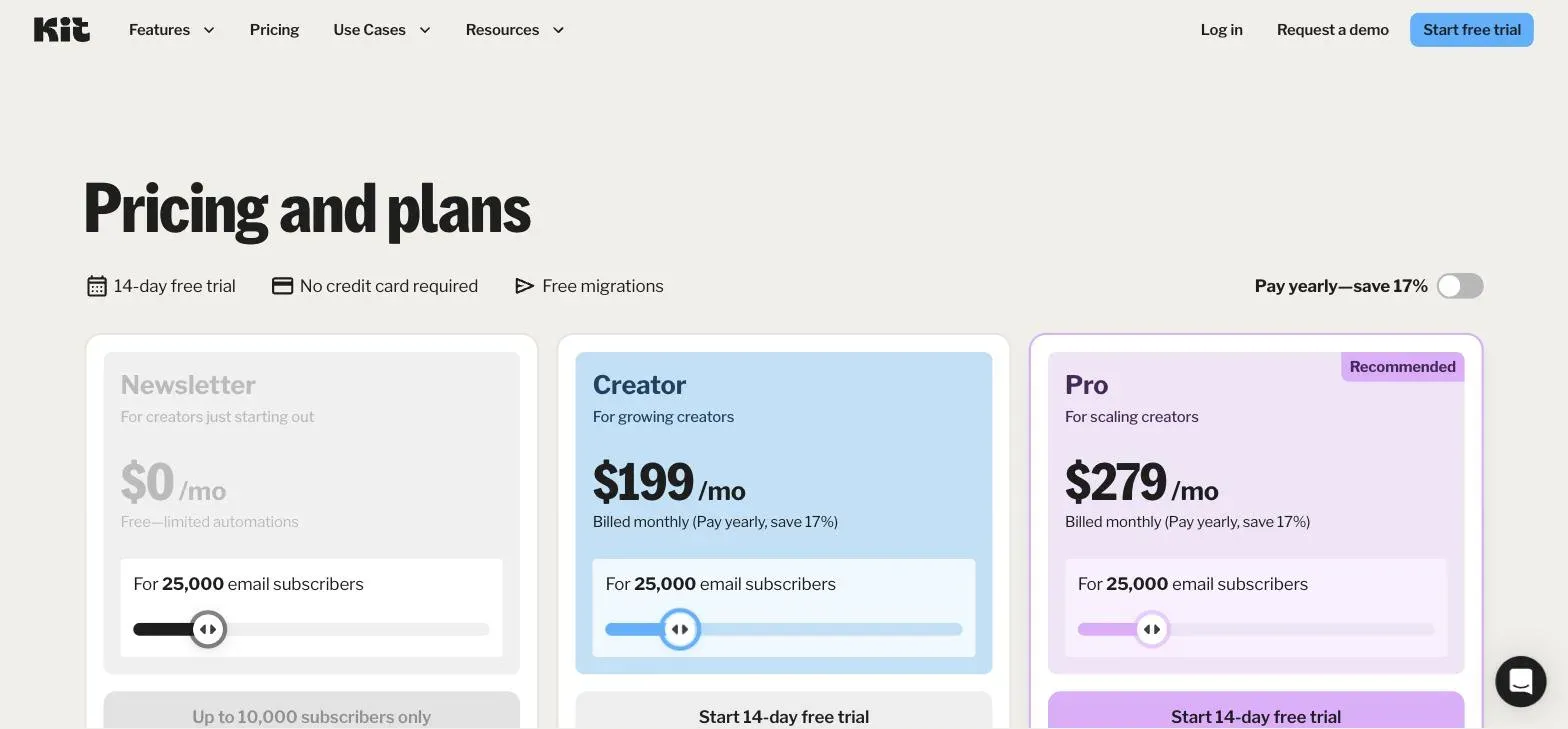
Ten thousand, then. Not unlimited, and easy to misread as unlimited.
Where the line falls
Put the two tables together and the decision reduces to two questions.
Do you need automation beyond one sequence? If yes, Kit’s free tier is off the table and you’re comparing $39 against $19 — MailerLite, comfortably, unless something specific about Kit’s product matters to you.
Is your list under 10,000? If yes and automation is not a blocker, Kit is free and MailerLite is not. Nothing in MailerLite’s pricing competes with zero.
That gives a clean rule:
- Under 10,000 subscribers, simple automation → Kit, free. Saves $19–$100 a month against MailerLite.
- Under 10,000, real automation needs → MailerLite. Roughly half Kit’s paid price, full features on every tier.
- Over 10,000 → MailerLite, on price, until the gap narrows enough that features decide instead.
The uncomfortable case is the middle one, because “real automation needs” is easy to imagine and hard to predict. A welcome sequence that tags buyers differently from browsers is a real automation. A single broadcast to everyone is not. Most people building a list overestimate how much of the former they’ll actually build in year one.
Is one automation enough?
Everything above hinges on this, and “do you need automation?” is a useless question because everyone answers yes. Here is a more decidable version: can everything you want to send be triggered by one thing happening?
Kit’s free tier gives you one basic visual automation. In practice that covers a single linear sequence — someone subscribes, and they receive a fixed series of emails. That is enough for a large number of real businesses:
- A newsletter with a welcome sequence
- A lead magnet that delivers a file and then nurtures
- A course launch that emails a fixed sequence to everyone who signs up
It is not enough as soon as two things need to happen differently:
- Buyers get a different sequence from non-buyers
- Someone who clicks a link gets tagged and routed elsewhere
- Re-engagement fires for people who haven’t opened in ninety days
- Two lead magnets each start their own follow-up
The second list is where most people end up, but usually in year two, not month one. That timing is the whole argument for starting on Kit’s free plan: you get the capacity now, and the moment you genuinely need branching logic, you move — with a list that exports cleanly and automations that were never complex enough to be painful to rebuild.
The mistake worth avoiding is paying for machinery in month one against a plan to use it in month eighteen. MailerLite at $19 is cheap enough that this feels harmless; over two years it isn’t nothing, and it’s a real amount to have spent on a feature you didn’t switch on.
The two-year arithmetic
Subscription decisions are not monthly decisions. The same three list sizes, compounded over 24 months at a flat list size:
| Subscribers | Kit, free | Kit, Creator | MailerLite, Comfort |
|---|---|---|---|
| 1,000 | $0 | $936 | $456 |
| 5,000 | $0 | $2,136 | $1,176 |
| 10,000 | $0 | ~$2,900 | ~$2,400 |
| 25,000 | not available | $4,776 | $4,296 |
Under 10,000 subscribers, the comparison isn’t $39 against $19. It’s $0 against $456 to $2,400, and no feature discussion survives contact with that number unless you genuinely need the branching logic described above.
Above 10,000, Kit’s free plan stops and the two converge fast: $4,776 against $4,296 over two years at 25,000 subscribers is an eleven percent difference on a four-thousand-dollar decision. At that point you should be choosing on the product, not the price, because the price has stopped being interesting.
The one caveat: these assume a flat list. A list that grows walks up both curves, and MailerLite’s is steeper — it multiplies 9.4× between 1,000 and 25,000 subscribers against Kit’s 5.1×. If you expect real growth, price both at the size you’re heading for rather than the size you’re at.
What signing up actually gives you
Neither of these is what you’d guess from the pricing page. We opened both accounts to check.
Kit does not put you on the free plan. Signup opens a 14-day trial of the Creator plan — the $39 one — and the free Newsletter plan is a deliberate downgrade you have to go and request. The billing screen says so in smaller type: “you can cancel your free trial and downgrade to the free plan immediately”.
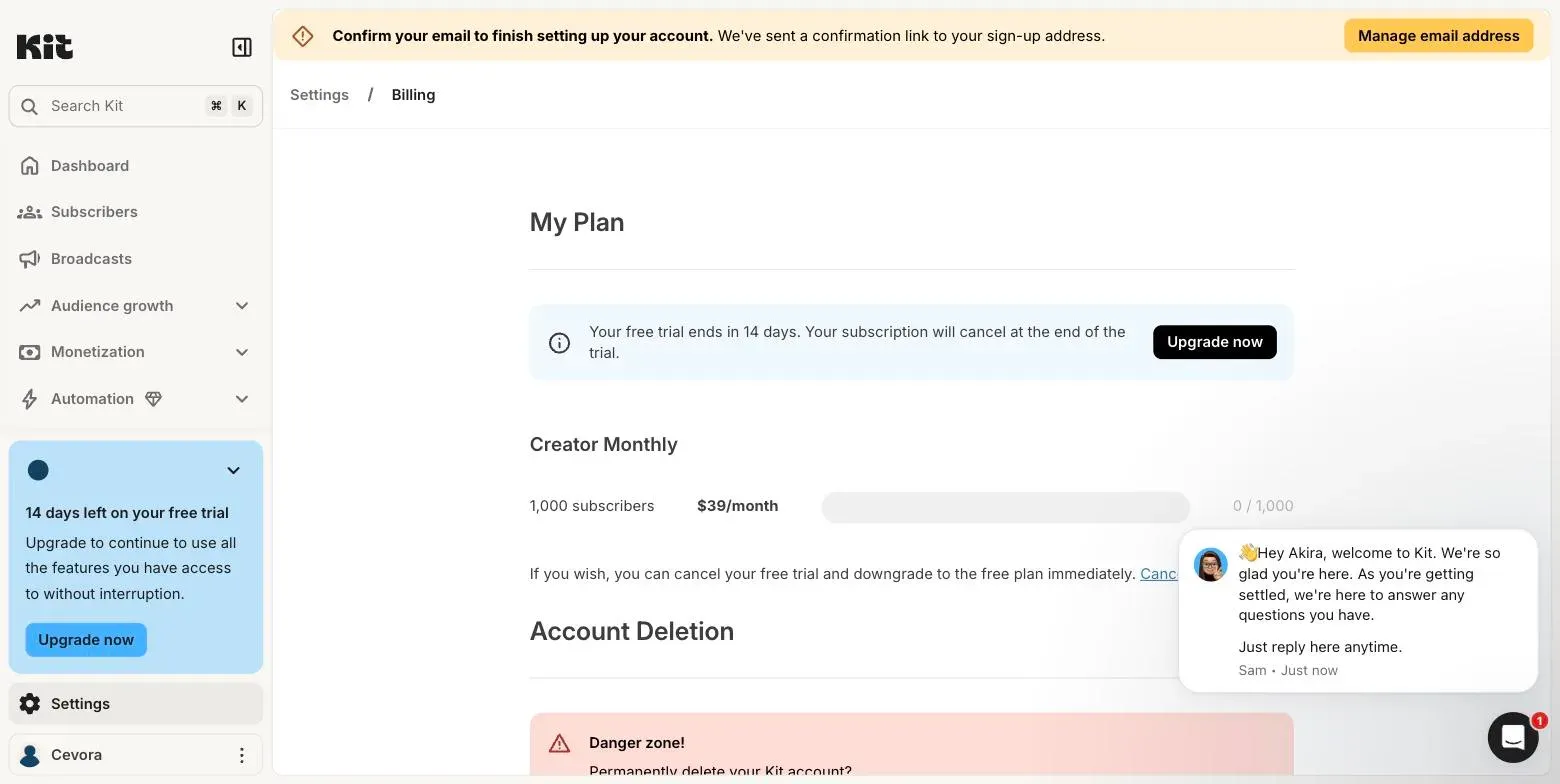
That matters more here than it would elsewhere, because the free plan is the entire reason to choose Kit. The strongest argument for the tool is the thing you have to opt into.
MailerLite does the same, minus the ambiguity: a 14-day trial, labelled as such in the sidebar from the first screen after onboarding.
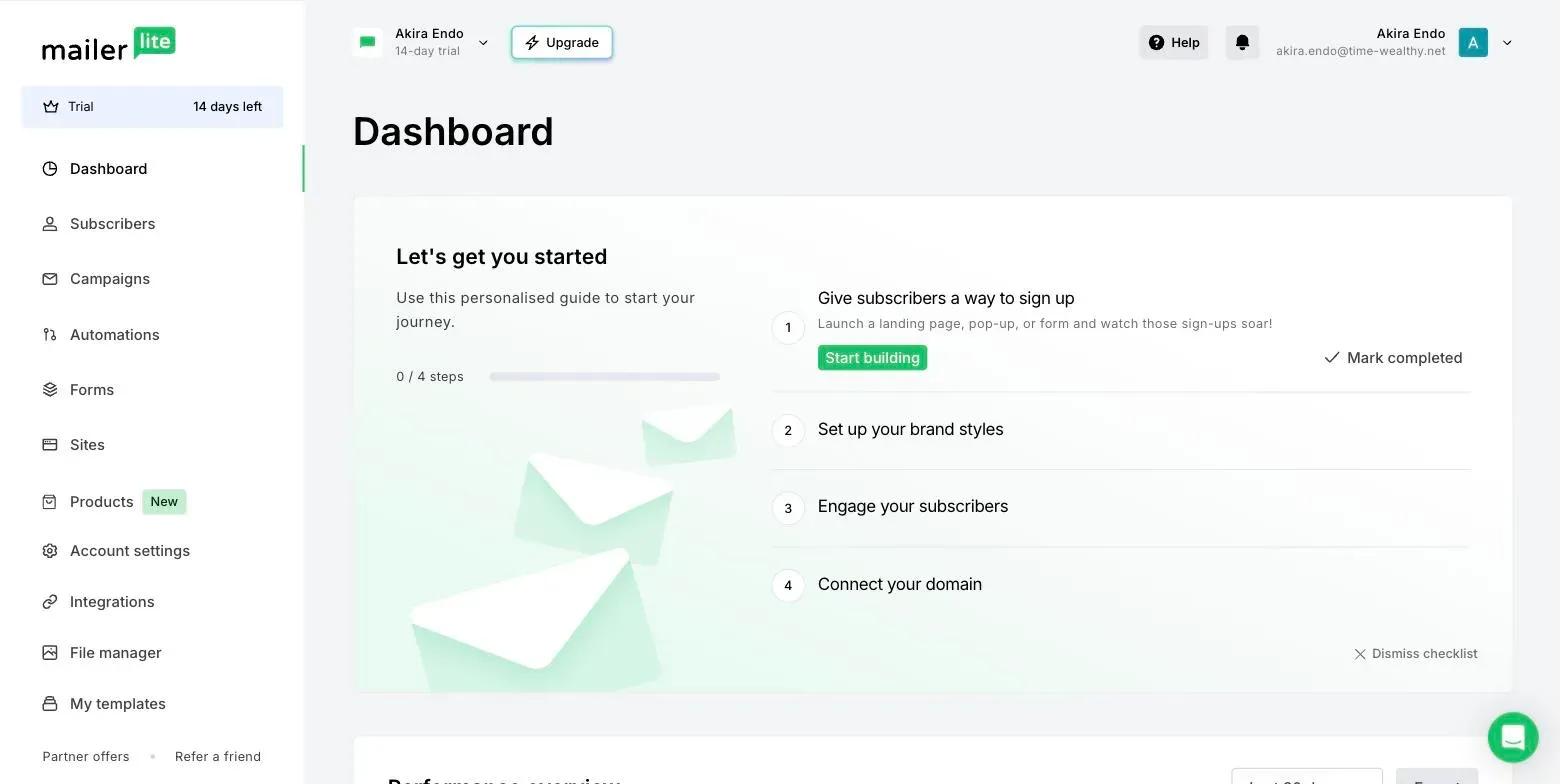
Neither asked for a card. Kit states outright that the subscription cancels at the end of the trial rather than billing. If you have been burned by a course platform trial that took a card up front and charged it, this category does not work that way — a forgotten cancellation here costs you features, not money.
MailerLite wants your postal address before you can use it. Not a card, but a physical address, blocking onboarding, cited as regional compliance:
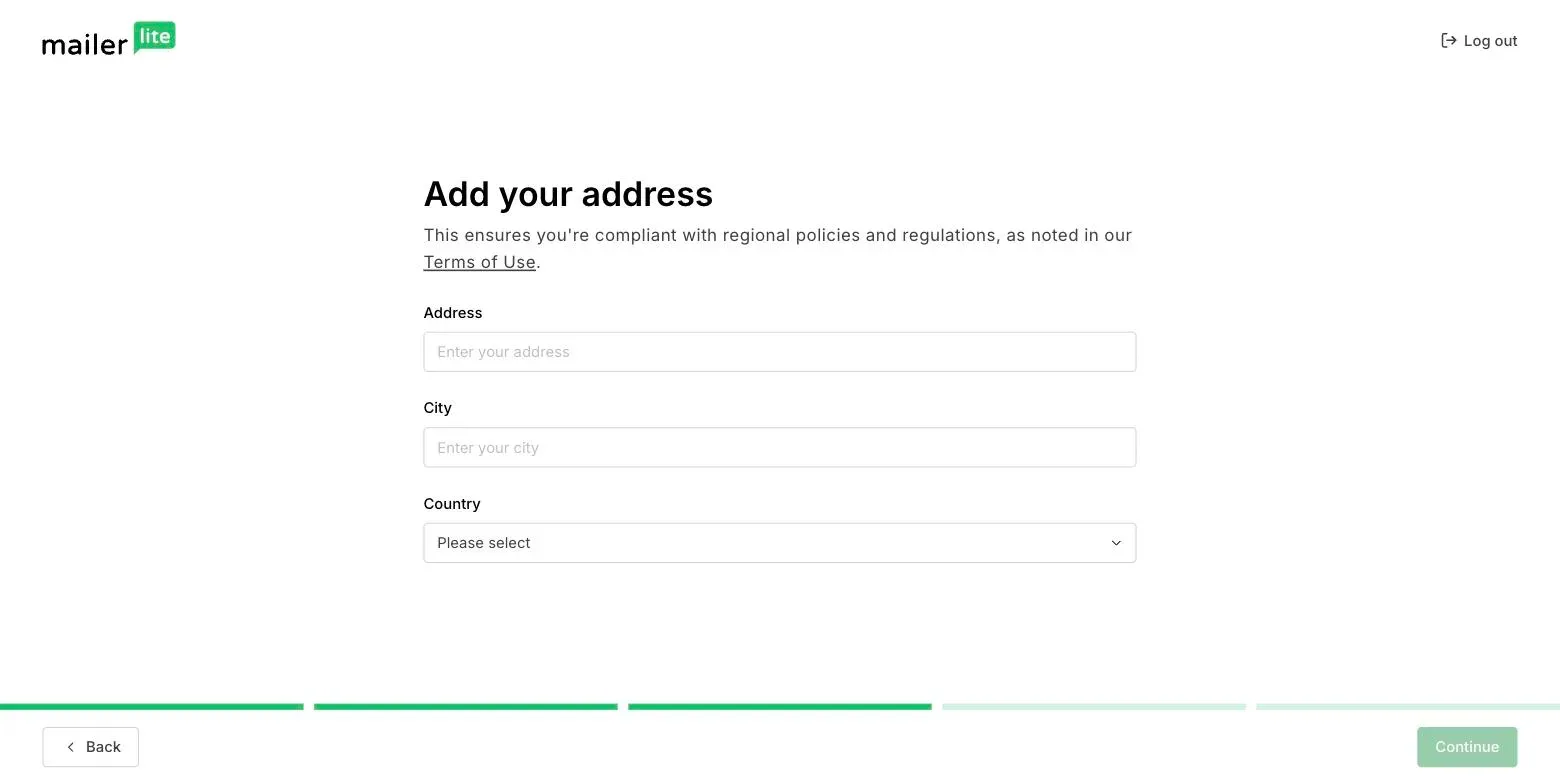
It’s a reasonable thing for an email platform to require and an unreasonable thing to discover ten minutes into “let me just try it”. Kit asked for nothing equivalent.
Beyond email: what else you get
Both ship more than a send button, and the extras point in different directions — worth knowing if either would let you cancel another subscription.
Per their published feature lists, Kit includes unlimited landing pages and forms on every tier including free, plus the ability to sell digital products and subscriptions directly. For a creator whose entire funnel is “landing page → email → sell a thing”, that’s the whole stack at $0, and it’s the reason Kit reads as a creator tool rather than a marketing tool.
MailerLite answers with a website builder and landing pages of its own, along with signup forms and popups. Its extras lean toward publishing — building the site the list lives on — rather than toward selling to the list.
Neither replaces a dedicated funnel builder, and if selling is the point, our funnel builder comparison prices tools built for that job. But if you were budgeting for a separate landing page tool alongside your email platform, check these first — that line item may already be covered.
Kit: expensive per subscriber, generous where it counts
Kit is built for people selling things to an audience rather than for marketing departments, and it shows in what the free tier includes: unlimited landing pages and forms, unlimited broadcasts, and the ability to sell digital products and subscriptions. Selling is a first-class feature, not an integration.
The paid tiers buy automation depth. That’s the honest description of the whole product: capacity is free, machinery costs money.
Strengths: by far the largest free tier in the category; selling digital products built in; no card to trial the paid plans; unlimited landing pages and forms even at $0.
Weaknesses: roughly double MailerLite’s price once you’re paying; the free plan’s single-automation limit is a genuine constraint rather than a nudge; and signup starts you on a paid trial, so the free plan needs claiming.
MailerLite: cheapest to start, steepest to grow
MailerLite’s pricing model is the cleaner of the two, and unusually clean for the category: you pay for list size and sending volume, not for access to features. Every paid plan includes the full feature set. There is no “automation is on the next tier up” surprise, because there isn’t a tier that withholds it.
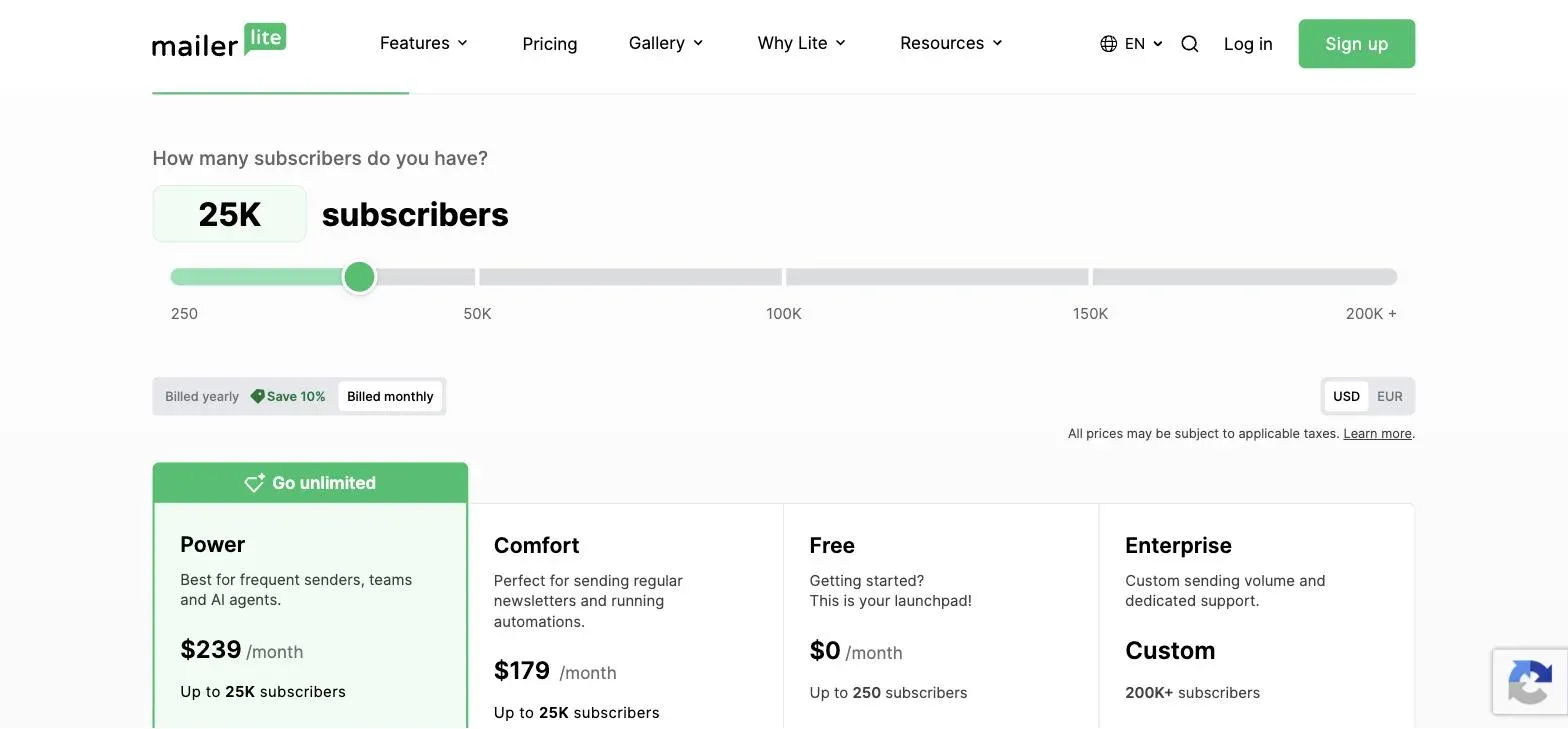
The cost of that is a steep curve. $19 at 1,000 subscribers becomes $179 at 25,000 — a 9.4× climb, and by that point the price advantage over Kit has nearly evaporated:
Strengths: lowest entry price; full features on every paid tier rather than gated by plan; predictable, honest pricing model.
Weaknesses: a free tier too small to operate on; one of the steepest cost curves in the category; the address requirement before you can use the product.
Which one fits which creator
You write a newsletter and sell the occasional product → Kit, free plan. One welcome sequence covers you, the capacity is enormous, and product sales are built in rather than bolted on. Downgrade into it after signup and revisit when you need branching.
You run launches with buyer and non-buyer paths → MailerLite. Automation is the deciding feature and MailerLite gives you all of it on the $19 plan, where Kit wants $39 for the equivalent.
You have a list over 10,000 → MailerLite, narrowly. Kit’s free ceiling is gone and MailerLite is cheaper, but by less than you’d expect. Compare the products at that point.
You’re migrating from something expensive and want the smallest bill → MailerLite. Full features on every paid tier means no second upgrade three months later.
You want to test both without commitment → either. Neither takes a card. MailerLite will want a postal address before it lets you in; budget two extra minutes.
Frequently asked questions
Which is cheaper? MailerLite, at every list size we measured, if you’re paying. Kit, by a wide margin, if your list is under 10,000 and you can work within one automation — because then Kit is free.
Can I really run a business on Kit’s free plan? Up to 10,000 subscribers, with unlimited broadcasts, landing pages and product sales, yes. The constraint is automation, not capacity. Check you’re actually on it after signup, because the trial doesn’t start you there.
Will either bill me if I forget to cancel the trial? Neither asked for a card, and Kit says explicitly that the subscription cancels at the end of the trial. Course platforms behave differently — don’t carry the habit across.
Does the list move easily if I pick wrong? The list does; a CSV export imports cleanly either way. Automations, forms, landing pages and tag structures do not, and those are what you rebuild. Switching early is much cheaper than switching later.
Bottom line
If your list is under 10,000 and your automation needs are modest, this isn’t close: Kit is free and MailerLite is $19 to $100 a month for the same list. Take the free plan, and remember to downgrade into it after signup.
If you need automation, or you’re past 10,000 subscribers, MailerLite is roughly half the price with no features held back, and that’s the whole argument.
The thing to avoid is picking on the monthly figure alone — that reads MailerLite as the obvious winner and misses that its competitor may cost you nothing at all. Both let you start free without a card. Import a few hundred subscribers into each and send one real broadcast before you decide.
Comparing more broadly? Our six-tool email pricing comparison prices these two against GetResponse, beehiiv, Mailchimp and Brevo at the same three list sizes.