beehiiv Review: What $0, $49, and $109 Each Actually Buy
beehiiv occupies a strange position in every comparison we’ve run: it has the most expensive entry price of any contact-priced email tool we measured, the gentlest price curve, one of the most generous free plans, and a feature list where the best items are irrelevant to most people. None of that resolves into “good” or “bad” — it resolves into built for a specific reader, and this review is about working out whether that reader is you.
The short version: beehiiv is what you pick when the newsletter itself is the product — when it will earn money through paid subscriptions, ads, or referrals, and you want the platform’s economics and growth machinery pointed at that. If email is instead the marketing channel for something else you sell, most of what you’d be paying for sits unused.
We opened our own account to check the parts a pricing page can’t show. Here’s what we found.
We have an affiliate relationship with beehiiv; links to it on this page are affiliate links, and signing up through them gives you 20% off for three months if you land on a paid plan. See our affiliate disclosure.
What we have and haven’t tested. The screenshots below are from our own beehiiv workspace — signup, dashboard, editor and billing screens — and every price was read off beehiiv’s calculator on monthly billing, moving the subscriber slider ourselves. We’re early in the trial, with a list of one; we have not run a large list, sold a paid subscription, or earned from the Ad Network, and nothing below pretends otherwise.
The trial is the top plan, and it can’t bill you
Signup is the most transparent flow of the six email tools we’ve opened accounts on, and it’s worth spelling out because “free trial” means something unusual here.
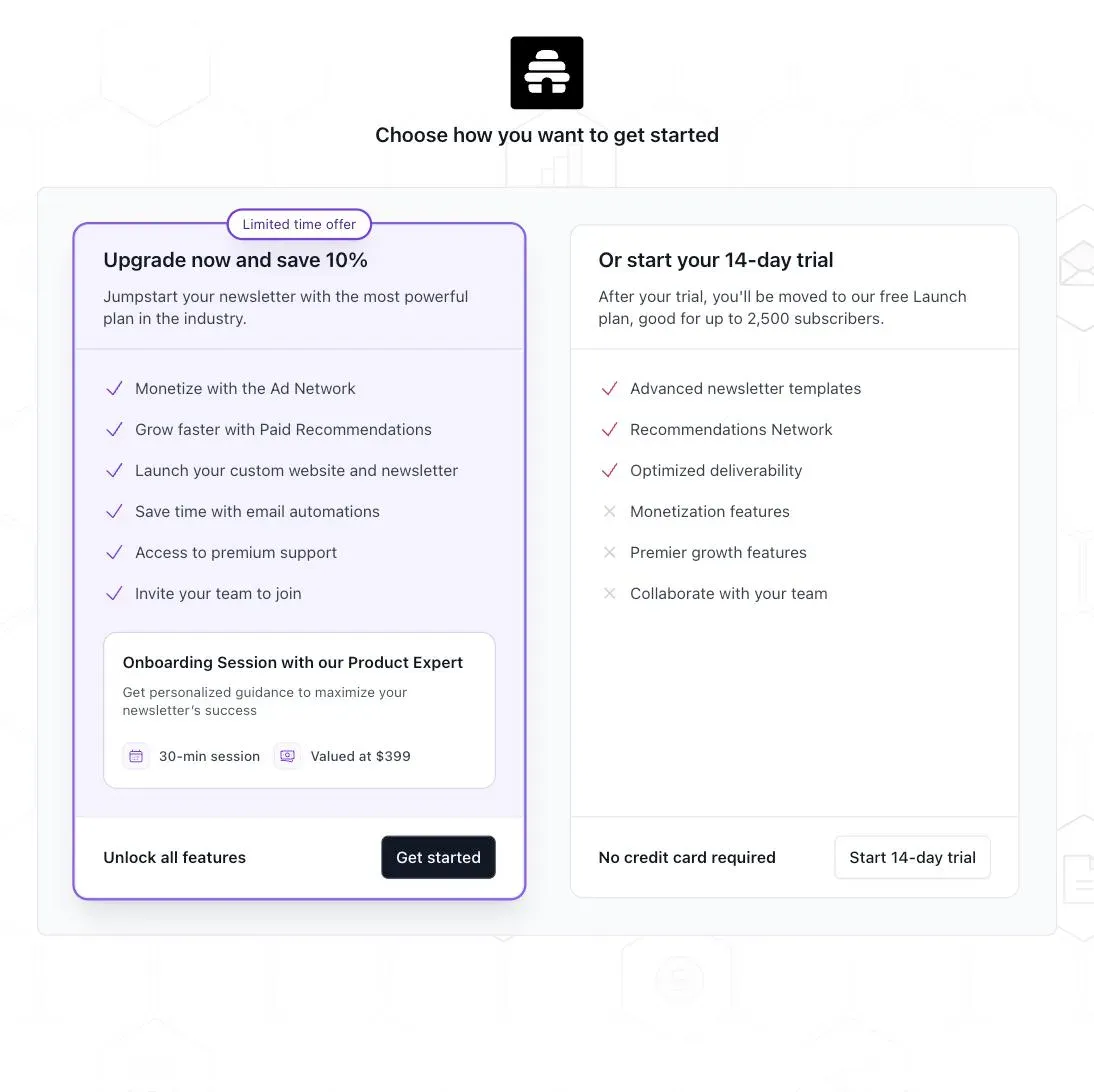
No card is requested. The signup screen offers a 14-day trial and states, right there, what happens when it ends — you’re moved to the free Launch plan:
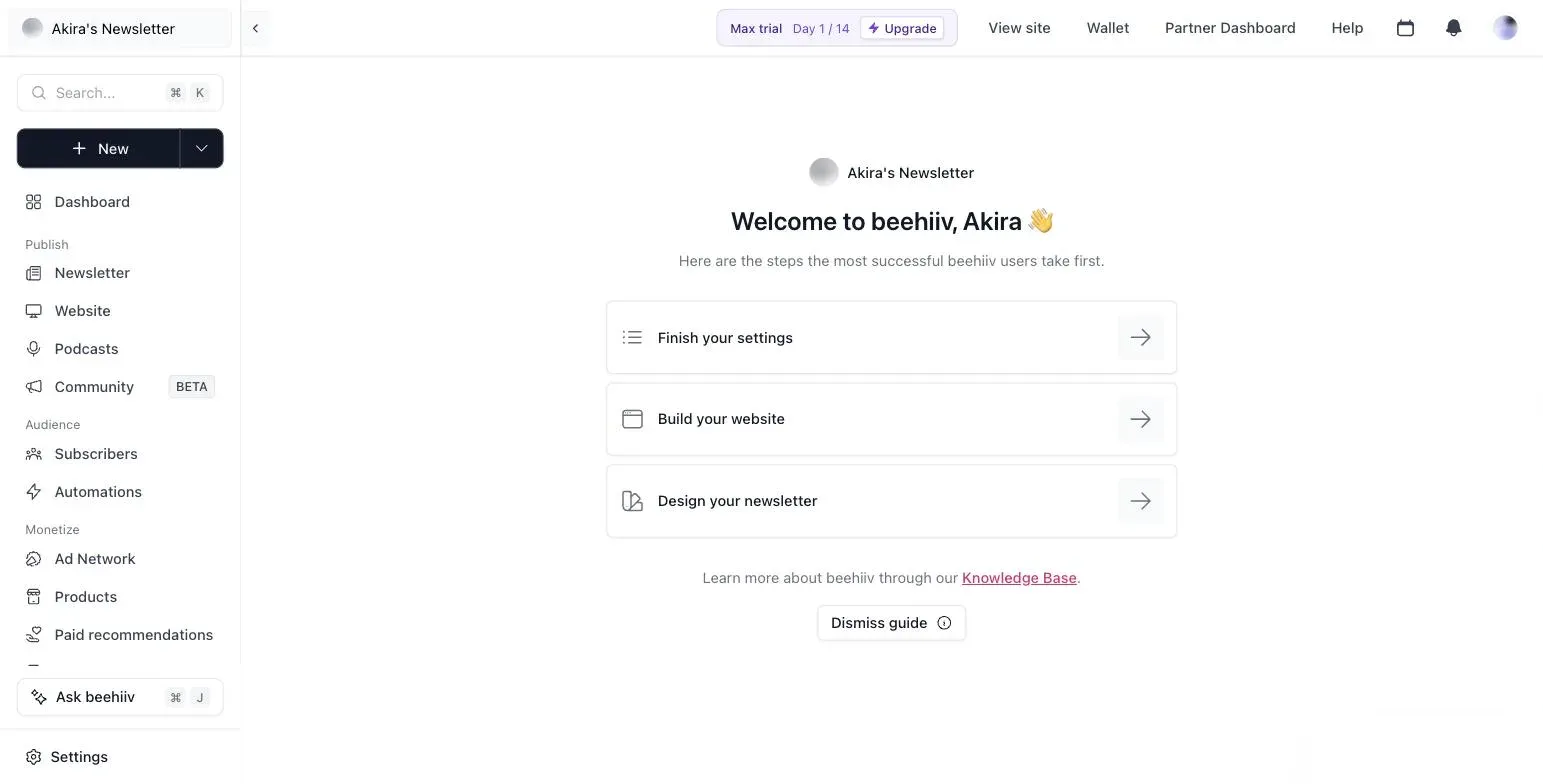
What it doesn’t say, and the dashboard does, is which plan you’re trialling: Max, the top tier, with a day counter pinned to the header:
The billing page is where the design gets genuinely unusual. It lists your current plan as Launch — $0/month — with a note that Max features are temporarily switched on:
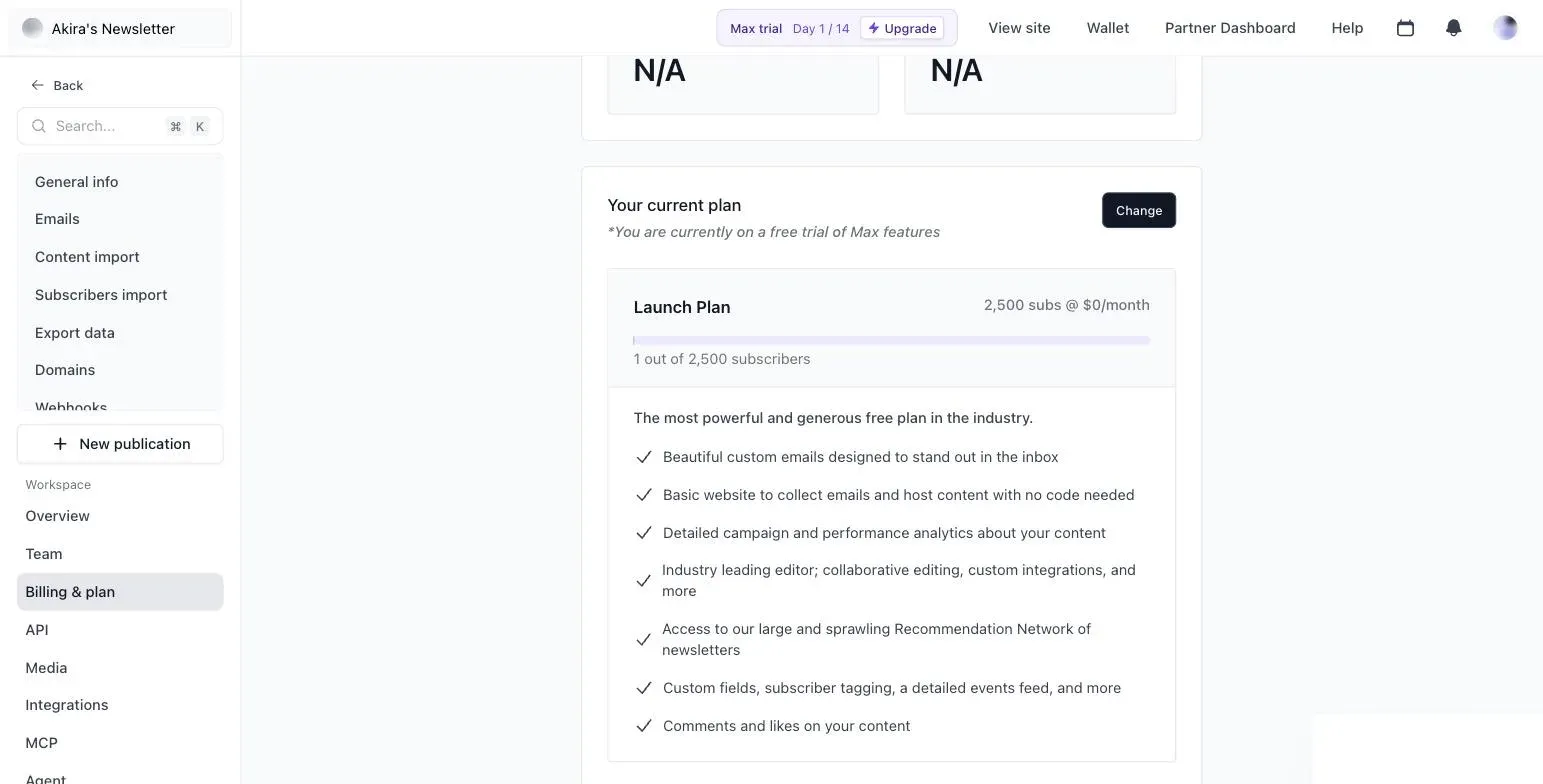
Read that structurally: the trial is a feature unlock on top of a free account, not a pending subscription. There is no stored card, no scheduled charge, and no cancellation task on your calendar. When day 14 arrives, features are subtracted; money is never involved. After watching course platforms handle trials with a card up front and a charge on day 15, this is the arrangement we’d like to see everywhere.
What $0 actually includes
Launch covers up to 2,500 subscribers with unlimited sends, and its feature list — from the billing page of our own account — is longer than “free plan” usually implies: the full editor, a hosted website with no code, campaign analytics, custom fields and subscriber tagging, comments and likes, and access to beehiiv’s cross-newsletter Recommendation Network.
Two of those deserve emphasis because competitors gate them. Subscriber tagging on a free plan is not standard — it’s the backbone of any segmentation you’ll ever do. And Recommendation Network access means the discovery machinery that makes beehiiv attractive is at least partly available before you pay a cent.
What Launch excludes is just as deliberate: paid subscriptions are absent entirely (not fee-laden — absent; the pricing page lists them from Scale up), and the Ad Network exists only as an invitation. The upsell surfaces inside the compose screen itself — our empty first draft carried a banner offering ad revenue, unlockable on Scale:
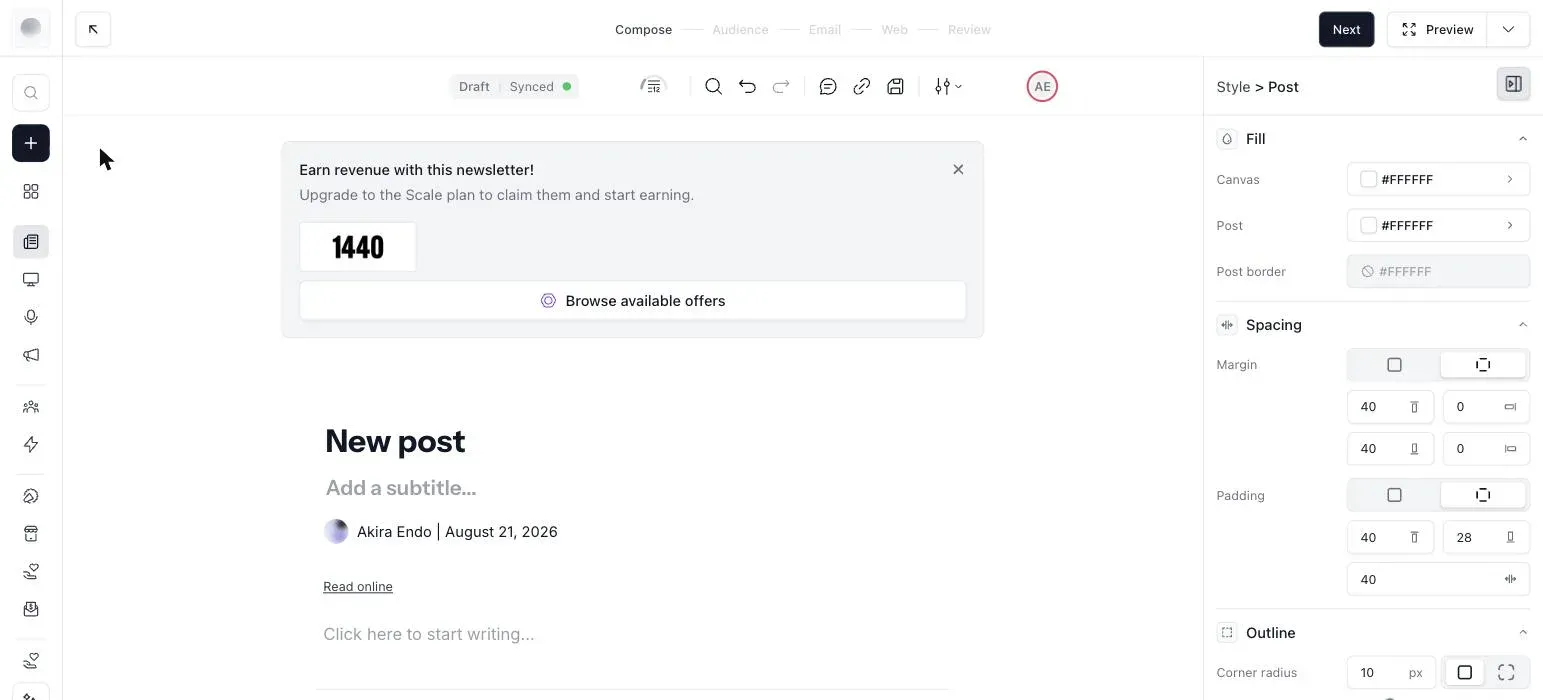
The pattern is clean: everything about writing and growing a newsletter is free to 2,500; everything about earning from one is paid. beehiiv charges you when the newsletter becomes a business, and more or less only then.
The editor writes once, publishes twice
The screenshot above shows the other thing that separates beehiiv from email-marketing tools like Kit or MailerLite: the compose flow runs Compose → Audience → Email → Web → Review, and every post is simultaneously an email and a web page on your hosted site. There’s no separate “blog” to maintain and no archive to wire up — the archive is a by-product of sending.
For a writer, this is the publication-shaped workflow Substack made standard, with more layout control (the style panel exposes typography, spacing and color per element). For a marketer sending campaign blasts they’d rather not host publicly, it’s a default worth knowing about rather than a selling point.
One honest footnote from our first minutes in it: the editor pre-fills your email footer with a placeholder US postal address until you set your own. Anti-spam law requires a real sender address, so treat that as a setup task, not decoration — the kind of detail you only notice with an account open.
The pricing, measured
Monthly billing, read off the calculator at three list sizes:
| Subscribers | Launch | Scale | Max |
|---|---|---|---|
| 1,000 | $0 | $49 | $109 |
| 5,000 | — (cap is 2,500) | $89 | $169 |
| 25,000 | — | $169 | $289 |
Here’s the calculator at 1,000 subscribers, where beehiiv looks its worst:
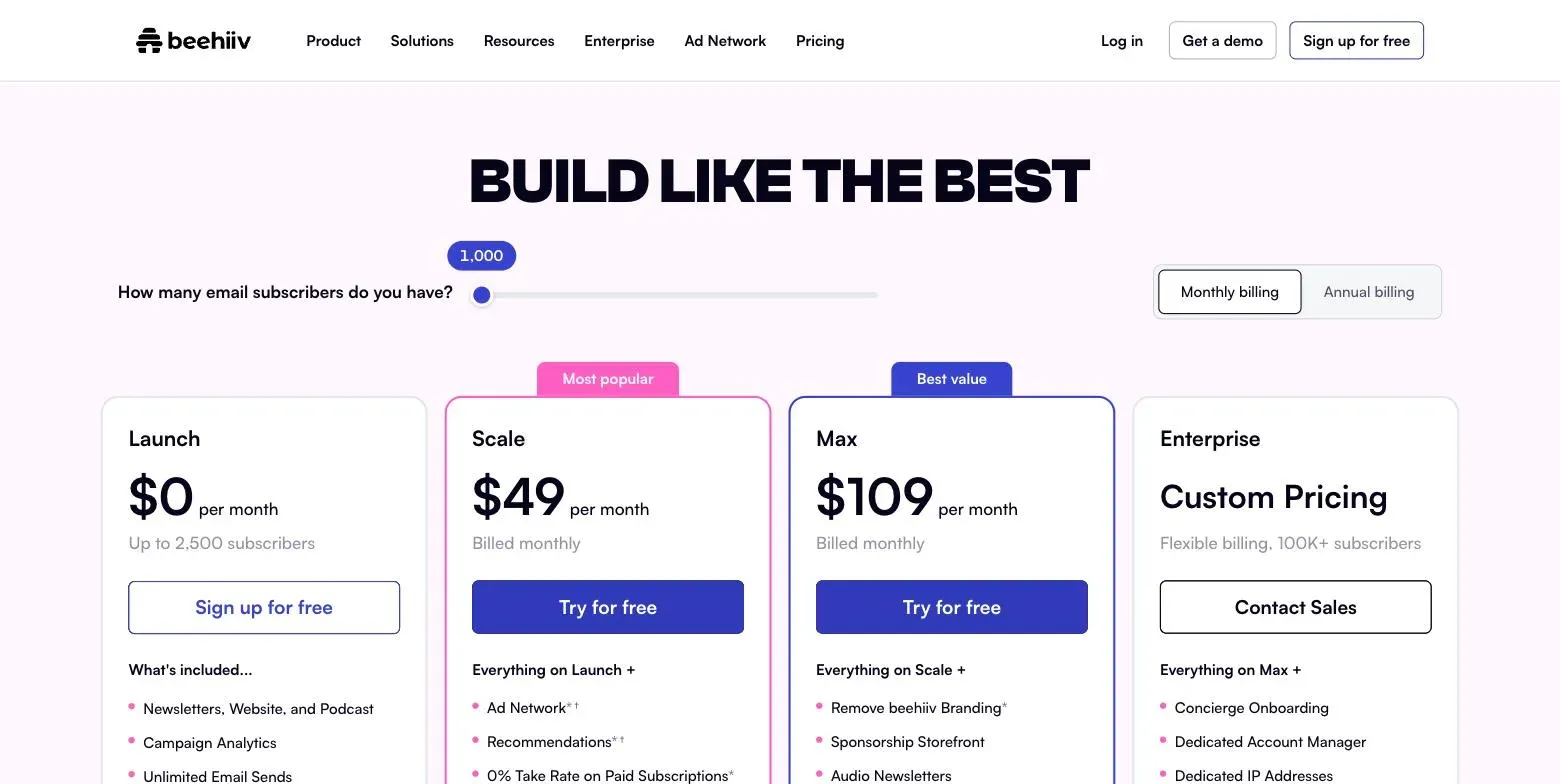
$49 is the highest entry price of any contact-priced tool we measured — against $19 for MailerLite, $39 for Kit. Most comparisons stop at that row and dismiss it, and if your list stays near 1,000, they’re right to.
But beehiiv’s curve is the gentlest in the category: 3.4× from 1,000 to 25,000 subscribers, against 9.4× for MailerLite and 5.1× for Kit. By 25,000, Scale’s $169 is second-cheapest of everything we measured, and cheaper than tools that started at less than half its price. The pattern — expensive first, cheap later — is exactly inverted from the budget tools, and it means the entry price is the worst possible basis for judging it. The full six-way table, with where each ordering flips, is in our creator email comparison.
The 0% that justifies the fee
Scale’s headline feature is what it doesn’t take: 0% of your paid subscription revenue, minus only Stripe’s standard processing. Substack’s equivalent cut is 10% of gross, forever. That single difference is most of the financial argument for beehiiv, and it’s mechanical enough to compute: at a $10 subscription price, Substack’s cut equals Scale’s fee at one paying reader per dollar of fee — 49 paying readers at a 1,000-person list, 169 at 25,000. Past that line, every additional paying reader earns more on beehiiv, and the gap compounds monthly. We’ve worked through the full crossover math, including when staying on Substack is correct, in our Substack alternatives breakdown.
Beyond subscriptions, Scale unlocks the Ad Network (sponsorships placed into your sends), Boosts (paid cross-newsletter recommendations, in both directions — you can earn by recommending), automations and surveys. We haven’t earned a dollar through any of them and won’t quote anyone’s revenue screenshots; structurally, they’re all bets on the same premise — that your newsletter has an audience worth monetising. Max, at roughly double Scale, adds removal of beehiiv branding, a sponsorship storefront and audio newsletters: a “the newsletter is a serious business” tier, and not the place to start.
The first hour: what actually needs setting up
The dashboard greets a new account with a three-item checklist — finish your settings, build your website, design your newsletter — and it’s a fair map of the real work. From our own first session, the tasks worth doing before you import anyone:
The sender address. As noted above, the email footer ships with a placeholder postal address. Replace it with a real one (a P.O. box or virtual address works) before your first send — it’s a legal requirement everywhere that matters, and the default makes your newsletter look like it’s written from beehiiv’s office.
The custom domain. Launch supports one, free, and it’s the single highest-leverage setup task on any email platform: your sending reputation and your web archive’s SEO both accrue to whichever domain you use, and both are lost if you change it later. Set it on day one, exactly as you would anywhere else.
The import. If you’re arriving from elsewhere, the subscriber importer (and the Substack-specific one) lives under settings. Import before you design, not after — several layout decisions look different once real subscriber counts are in the analytics.
None of this is beehiiv-specific advice so much as advice beehiiv’s checklist happens to put in the right order. The trial clock gives you fourteen days of Max features to do it with; the setup itself needs less than an hour.
What leaving would look like
We evaluate every tool on its exits, because the switching cost you accept on day one is invisible until the day it isn’t. beehiiv’s ledger is cleaner than most.
What moves: your subscriber list exports to CSV from settings, with tags and custom fields; the web archive is yours to the extent your posts are portable prose. Standard, and sufficient.
What doesn’t: automations, the website design, and — the important one — your paid subscribers’ billing relationships. Paid subscriptions run on Stripe under beehiiv’s integration, so migrating them means re-establishing billing on the destination platform; plan that step with more care than the CSV. And anything earned through the Ad Network or Boosts is beehiiv-network revenue: it doesn’t exist off-platform, which is worth remembering when you weigh how much of your income to build on machinery you can’t take with you.
That last point is the honest caveat to the 0%-take-rate argument. beehiiv doesn’t tax your subscription revenue, but its growth and ad economics are network features — the more your earnings depend on them, the more the platform’s gravity holds you, fee or no fee.
A disclosure that doubles as a data point
One more thing visible in our screenshots that most reviews skip: the Partner Dashboard link in the header. Any beehiiv user can join the referral program from inside the app — it pays 50% of referred subscription revenue for twelve months, and it’s the same program our links on this page use, which is why our disclosure says what it says.
We mention it for transparency, but also because it’s genuinely part of the product’s economics for a certain kind of creator: if your audience includes people who start newsletters, beehiiv is unusual in letting the recommendation itself become a revenue line, no ad deal required. Treat any income projection you see attached to that — including ours, if we ever publish one — as unverified until it’s your own dashboard.
Who should pick it
- The newsletter is, or will be, the business. Paid subscriptions with 0% take, ads, referral machinery, discovery — no tool we’ve measured bundles the earning side this completely.
- You’re leaving Substack with real paid revenue. Same publication shape, a dedicated importer on the way in, and the 10% stays in your pocket past the crossover.
- You’re starting from zero and want a free runway with growth mechanics. Launch’s 2,500-subscriber cap with tagging and Recommendation Network access is a genuinely operable free plan, and the trial ends by subtraction, not by invoice.
Who shouldn’t
- Email is your marketing channel, not your product. If the money comes from courses or digital products, beehiiv’s best features idle while you pay the category’s highest entry price. A funnel-shaped or automation-shaped tool fits better — that comparison lives in our creator email guide.
- You need deep automation on a budget. Automations are a paid-tier feature here, and $49 buys them in a newsletter-first shape; MailerLite sells the pure automation toolkit at $19.
- Your list will hover around 1,000 and the newsletter earns nothing. You’d be paying the worst price on the chart for machinery you don’t use — or living happily inside Launch, which is free, in which case: do that.
Frequently asked questions
Will the trial charge me if I forget about it? It can’t. No card is taken, and the billing page lists your plan as Launch at $0 throughout — the trial adds Max features temporarily rather than starting a subscription.
Is the free plan usable long-term? To 2,500 subscribers, yes, and less grudgingly than most: unlimited sends, tagging, analytics, a hosted site and recommendation access. The hard wall is monetisation — paid subscriptions simply don’t exist on Launch.
How does it compare with Substack? Same publication shape, opposite economics: Substack is free until it takes 10% of your paid revenue; beehiiv charges a flat fee and takes 0%. Small paid lists favour Substack, growing ones favour beehiiv — the crossover is at one paying reader per dollar of beehiiv’s fee, worked through in our Substack alternatives piece.
Scale or Max? Start on Scale; it carries the economically important features (0% take, ads, Boosts, automations). Max’s additions are branding removal and sales tooling that matter after the newsletter is earning, and the calculator will tell you exactly what the jump costs at your size.
The verdict
beehiiv prices like what it is: a bet on your newsletter becoming a business. The bet costs nothing to place — Launch is a real free plan and the trial is the rare one that structurally cannot bill you — and gets expensive precisely when, and only when, the earning machinery comes into play. If that machinery is what you’re building toward, the category’s worst entry price turns into one of its best deals by 25,000 subscribers. If it isn’t, admire the design and pick a cheaper shape of tool.
Free to 2,500 subscribers with no card, and signing up through that link adds 20% off for three months if you do end up on a paid plan.