Email Marketing for Creators: What 6 Tools Cost at 1K, 5K, and 25K Subscribers
Every email marketing comparison quotes a starting price. Almost none of them tell you the number that matters, which is what you’ll pay in two years when the list you’re building today has actually grown.
Email tools price on list size, so the headline figure describes a moment you pass through once and never see again. The tool that looks like the obvious budget pick at 1,000 subscribers can sit near the top of the range at 25,000, and the one that looked expensive at the start can end up the cheap one. So this comparison prices six tools at three list sizes, using each vendor’s own calculator, and shows where the ordering changes.
All figures below were read off each vendor’s pricing page on 21 August 2026, on monthly billing, by moving the subscriber slider ourselves rather than quoting the default view. Annual billing knocks roughly 10–18% off depending on the vendor. Prices change; check before you commit.
Some links in this article are affiliate links — see our affiliate disclosure. It doesn’t change what we recommend.
What we have and haven’t tested. The pricing here is measured, not quoted: we set each calculator to 1,000, 5,000 and 25,000 subscribers and recorded what came back, and those screens are the screenshots below. We also opened accounts on Kit, MailerLite, GetResponse and Brevo to see what signing up actually puts you on, which turned out to be a section of its own. We have not signed up to Mailchimp or beehiiv; everything about those two is their published pricing, and we say so where it matters.
Three questions that decide this, and one that doesn’t
1. What will this cost at the list size you’re building toward? Not today’s size. Pick the number you expect in eighteen to twenty-four months and price every candidate there as well as here. This single habit changes the answer more often than any feature comparison.
2. How far does the free plan actually go? “Free plan” means wildly different things in this category — the gap between the smallest and largest free tier here is fortyfold. For a creator with a list under 10,000, that difference can be worth more than every feature on every paid plan combined.
3. What breaks if you leave? Your list is portable; a CSV export is a CSV export. Your automations, forms, landing pages, and tagging logic are not. The switching cost isn’t the data, it’s the plumbing you rebuilt around the tool.
The question that decides less than you’d think: deliverability claims. Every vendor here advertises superior inbox placement and none will show you a controlled comparison. Treat it as noise.
What six tools actually cost
Monthly billing, entry-level paid plan, priced at each list size:
| Free plan cap | 1,000 subscribers | 5,000 | 25,000 | 1K → 25K multiple | |
|---|---|---|---|---|---|
| Mailchimp (Essentials) | 250 | $14.33 | $35.82 | $137.06 | 9.6× |
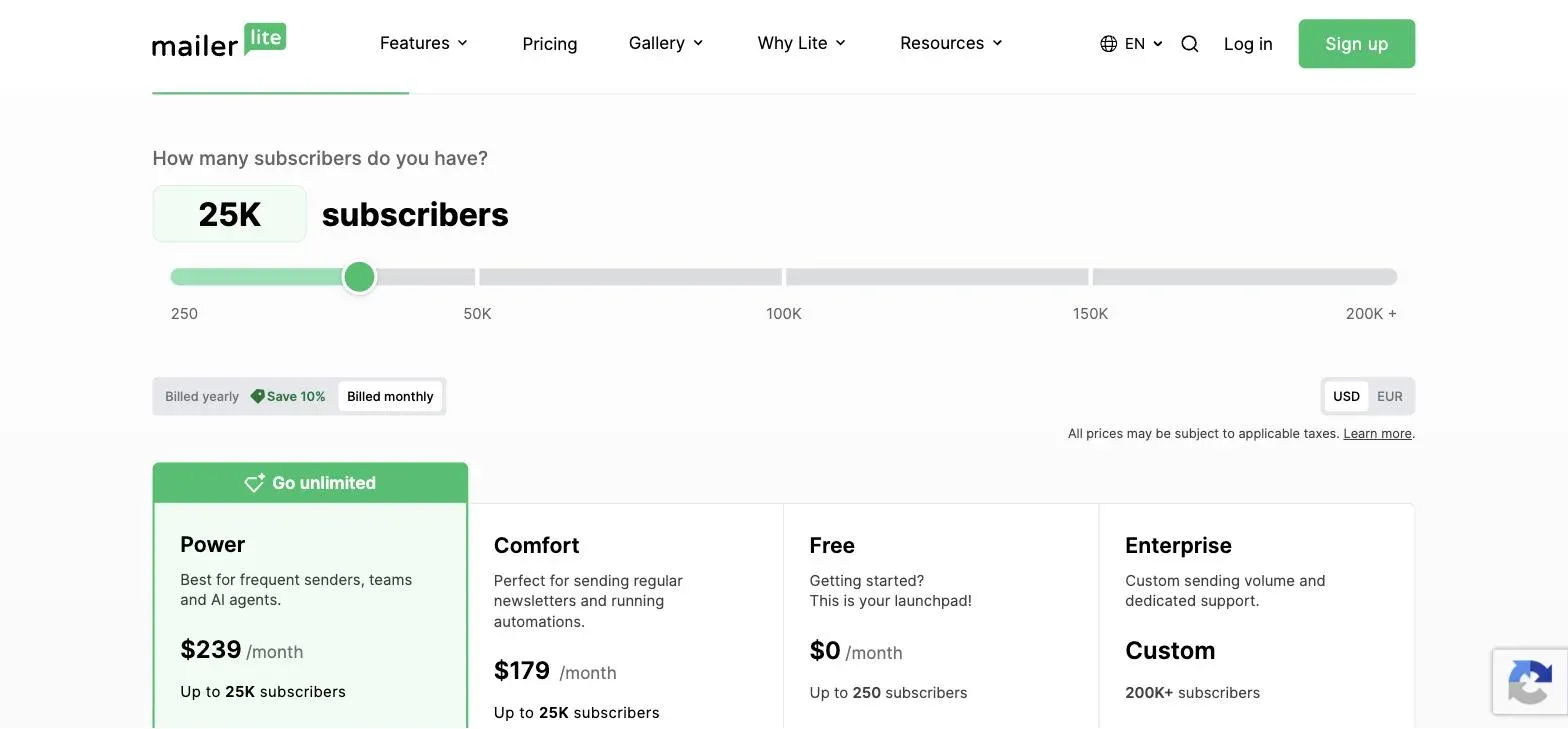
| MailerLite (Comfort) | 250 | $19 | $49 | $179 | 9.4× |
| GetResponse (Starter) | 500 | $19 | $54 | $174 | 9.2× |
| Kit (Creator) | 10,000 | $39 | $89 | $199 | 5.1× |
| beehiiv (Scale) | 2,500 | $49 | $89 | $169 | 3.4× |
| Brevo (Starter) | 300 emails/day | $9 per 5,000 emails — priced on sends, not subscribers | n/a |
Higher tiers, same list sizes: Mailchimp Standard $24.30 / $53.89 / $158.87. MailerLite Power $39 / $69 / $239. Kit Pro $79 / — / $279. beehiiv Max $109 / $169 / $289. GetResponse Marketer $59 at 1,000 and $215 at 25,000; Creator $69 and $249. Brevo Standard $18.
Four things fall out of that table.
The ordering shuffles hard. beehiiv is the most expensive contact-priced tool at 1,000 subscribers and the second cheapest at 25,000. MailerLite goes the other way: joint-cheapest at the start, second most expensive at the end. Nothing about the products changed — only the size of the list.
The cheap ones get expensive fastest. That last column is the one nobody publishes. Mailchimp and MailerLite multiply by roughly 9.5× between 1,000 and 25,000 subscribers; beehiiv by 3.4×. Pick on entry price and you are, more often than not, picking the steepest curve available.
The spread collapses as you grow. At 1,000 the cheapest contact-priced tool is a third of the most expensive ($14.33 against $49); at 25,000 the gap is about 1.45× ($137.06 against $199). Price shouts early, when the amounts are small, and whispers later, when they aren’t.
One of them isn’t playing the same game. Brevo prices on emails sent rather than contacts stored, which makes it incomparable in a subscriber column and worth understanding separately — see below.
The free plans are not comparable
Lumping these together as “has a free plan” is the single most misleading thing a comparison can do:
| Tool | Free plan | What you give up |
|---|---|---|
| Kit | Up to 10,000 subscribers | Limited automations (1 basic visual automation) — and you have to downgrade into it, see below |
| beehiiv | Up to 2,500 subscribers | Ad network, recommendations, 0% take rate on paid subscriptions |
| Brevo | Unlimited contacts, 300 emails/day | A daily send cap rather than a list cap — a different shape of limit entirely |
| GetResponse | Up to 500 contacts, 2,500 sends/month | A send cap tight enough to be a real constraint |
| MailerLite | Up to 250 subscribers | Most of the platform; 2,500 emails/month |
| Mailchimp | Up to 250 contacts | Automations and most of what makes Mailchimp Mailchimp |
Kit’s free tier holds forty times more subscribers than Mailchimp’s or MailerLite’s. At 10,000 subscribers it’s worth roughly $130–150 a month against what the others charge for the same list — for as long as you can work without automation.
That last clause is doing real work, and it’s why this isn’t simply “use Kit, it’s free”. Kit’s free tier is a capacity gift with a capability cost. If you write a newsletter and sell a product occasionally, you may never feel it; if your business runs on a welcome sequence that segments buyers from browsers, you’ll feel it in week one.
It’s also worth knowing exactly where that tier stops, because the page hides it well. Set Kit’s calculator to 25,000 subscribers and the free plan doesn’t get more expensive — it greys out, with the button replaced by “Up to 10,000 subscribers only”:
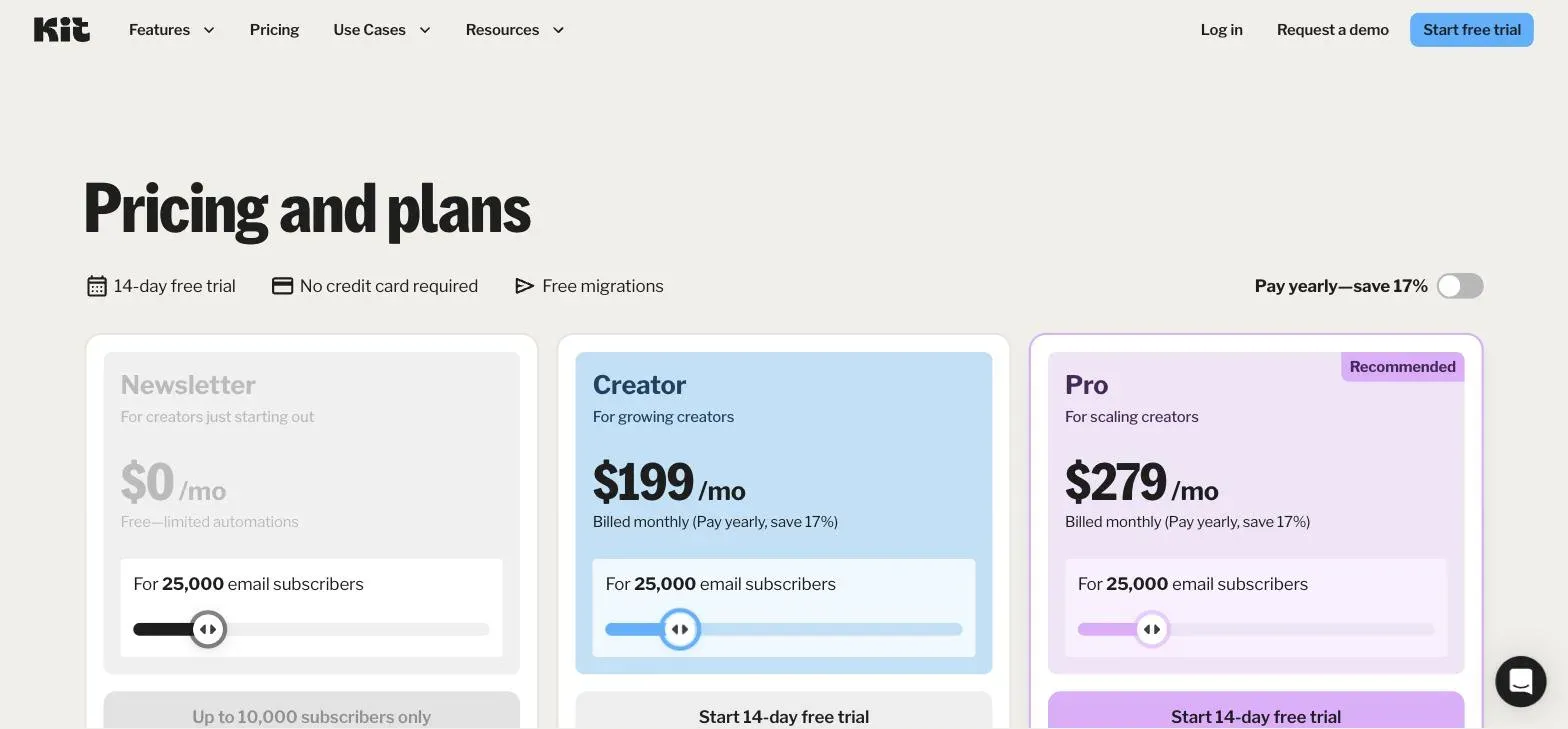
This briefly fooled us. Drag the slider far enough and the free card still reads “$0 /mo” while the subscriber count climbs into six figures — it’s a disabled card, not an offer, and a glance at that page would report a free plan with no ceiling at all.
What signing up actually gives you
Pricing pages describe plans. Signup flows hand you an account. Those turned out to be different things often enough that we opened accounts on four of these six to see which one you actually land on.
Three of the four started us on a trial of a paid plan rather than the free plan being advertised.
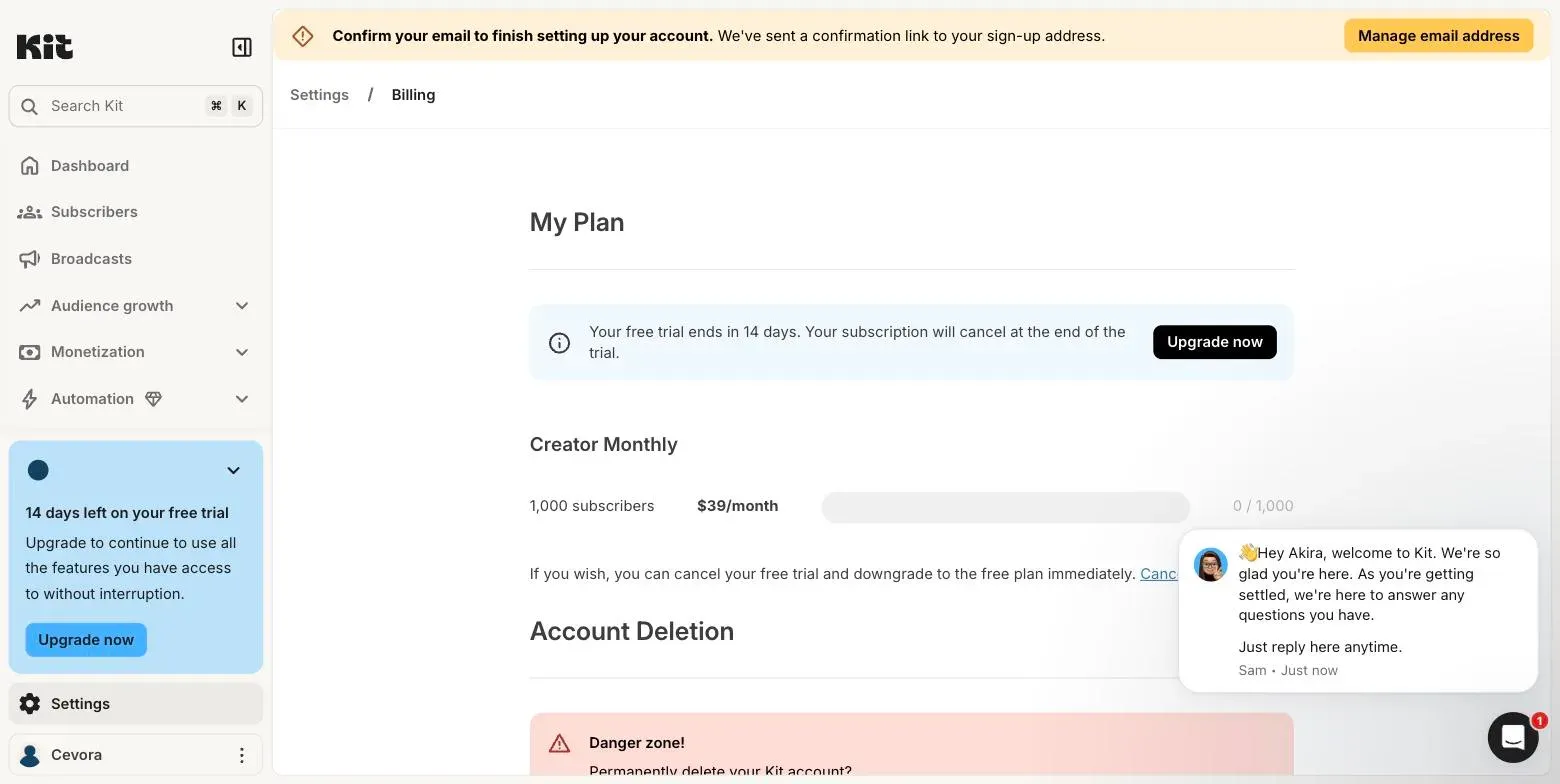
Kit puts you on a 14-day Creator trial — $39/month at 1,000 subscribers — not the free Newsletter plan. The free plan is still there, but you have to go and ask for it. The billing screen offers, in smaller type, to “cancel your free trial and downgrade to the free plan immediately”:
MailerLite does the same: a 14-day trial, labelled as such in the sidebar from the first screen after onboarding.
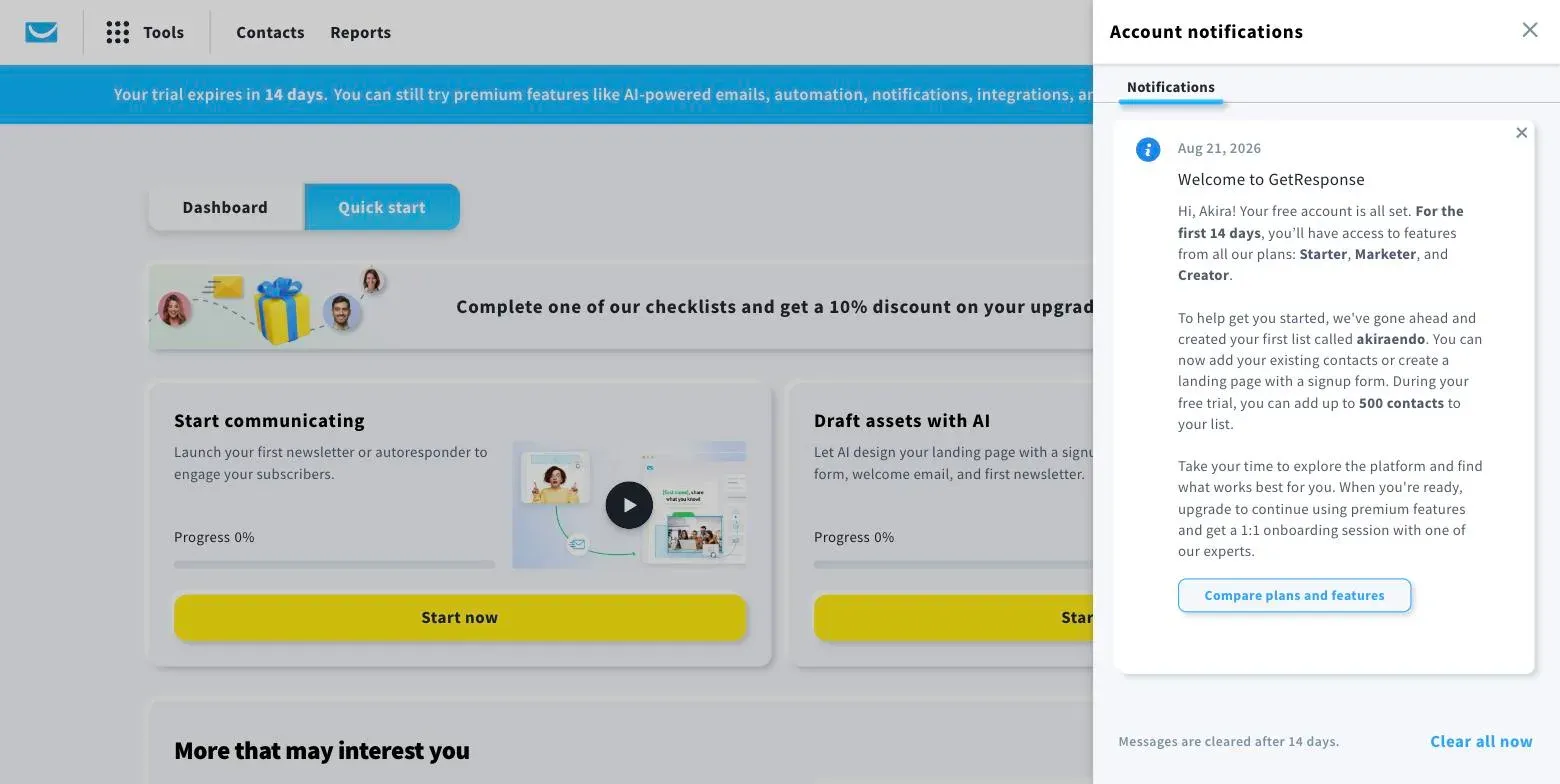
GetResponse was the clearest of the four: its welcome message says the free account is already set up, and that for 14 days you additionally get features from all its paid plans, with 500 contacts — matching its published free tier exactly.
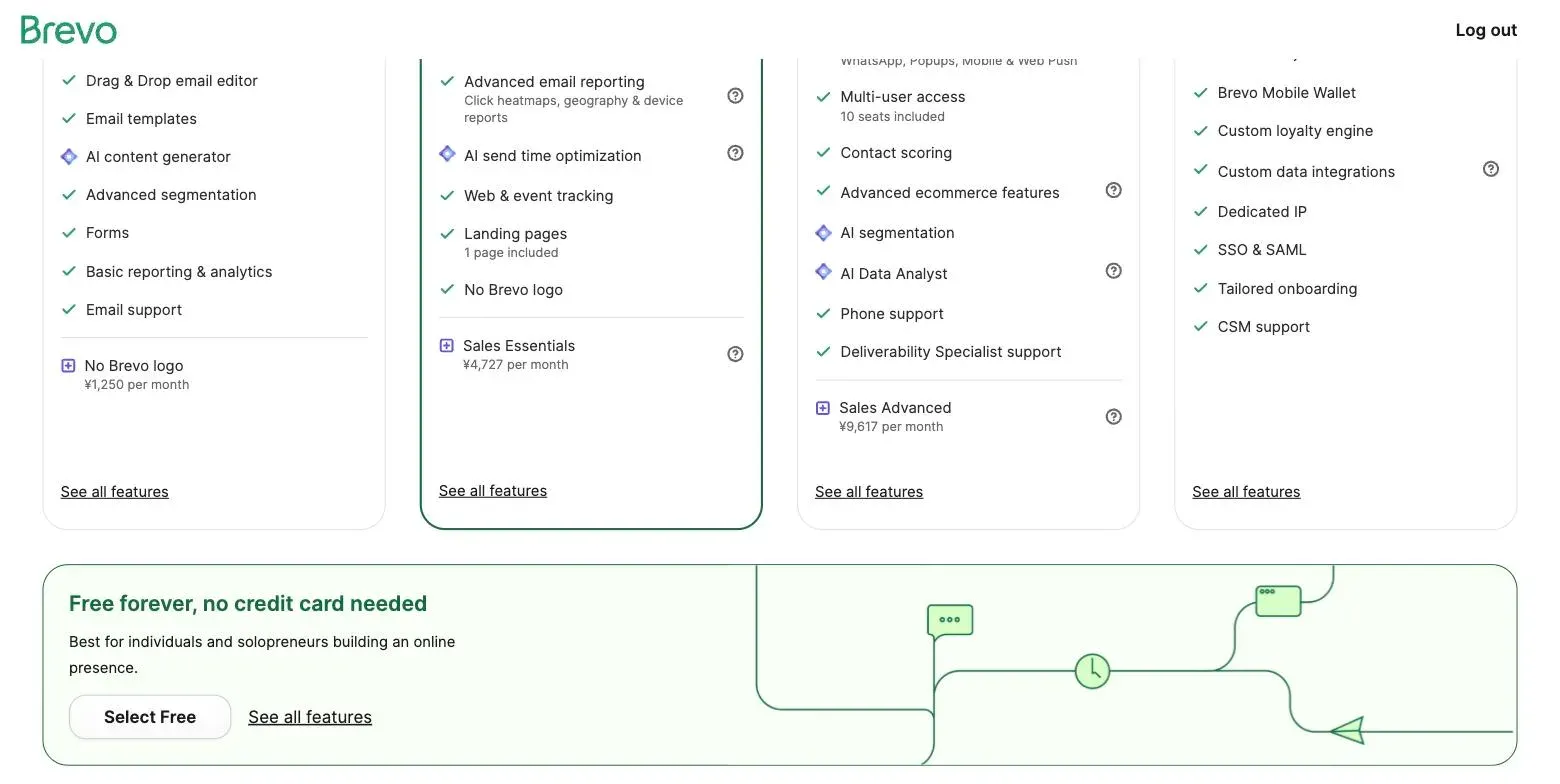
Brevo does put you on the free plan, but only if you can find it. The plan selection page leads with four paid tiers and their full feature lists; “Free forever, no credit card needed” sits underneath all of it, below the fold:
There’s a large saving grace: none of the four asked for a card. Kit states outright that the subscription cancels at the end of the trial. Compared with course platforms, where a trial attaches itself to a plan and bills it, a forgotten cancellation here costs you features rather than money.
Two want something else instead. MailerLite requires a physical postal address before you can use the product, citing regional compliance; Brevo requires phone verification before your first campaign. Both are worth knowing before you sit down to “just try it for ten minutes”.
The upshot for the free-tier table above: those caps are real, but on Kit and MailerLite you don’t start on them. Check which plan you’re on before concluding a tool is expensive — or that it’s free.
MailerLite: cheapest to start, steepest to grow
MailerLite leads on price at the bottom of the market: $19/month at 1,000 subscribers on Comfort, with every paid plan including the full feature set. You pay for list size and sending volume, not for access to features — a clean model, and rarer than it should be.
The catch is the curve. That $19 becomes $49 at 5,000 and $179 at 25,000 — a 9.4× climb, second only to Mailchimp’s, and enough to take MailerLite from joint-cheapest at the start to second most expensive at the end:
The free plan is also the least generous in this comparison at 250 subscribers and 2,500 monthly emails — enough to evaluate the product, not enough to run anything on.
Strengths: lowest entry price; full feature set on every paid tier rather than gated by plan; clean, predictable pricing model.
Weaknesses: one of the two steepest cost curves here; a free tier too small to launch on; the price advantage disappears entirely by 25,000 subscribers.
GetResponse: MailerLite’s pricing twin, with more platform attached
GetResponse tracks MailerLite almost exactly on price — $19 at 1,000, $54 at 5,000, $174 at 25,000 — which makes the comparison between them a question of scope rather than cost.
Where they diverge is what’s in the box. GetResponse sells itself as a broader marketing platform: landing pages, signup forms, and unlimited monthly email sends even on Starter, with sales funnels arriving on the Marketer plan at $59 (at 1,000 contacts) and webinars above that. If you’d otherwise be paying for a separate landing page tool, that changes the arithmetic in a way the headline price doesn’t show.
Its free tier — 500 contacts with a 2,500-send monthly cap — sits between MailerLite’s and beehiiv’s, and the send cap binds before the contact count does: 500 contacts emailed weekly is 2,000 sends a month, so you hit the ceiling at roughly the list size the plan advertises.
One thing worth checking yourself: the funnel feature most people shop GetResponse for is not on the plan its headline price refers to.
Strengths: same low entry price as MailerLite with a wider platform attached; unlimited sends on every paid tier; landing pages and forms included rather than sold separately.
Weaknesses: an almost equally steep curve to 25,000; funnels and webinars sit well above the entry plan; more product than a pure newsletter operation needs.
Kit: expensive per subscriber, generous where it counts
Kit costs roughly twice MailerLite at the bottom — $39 against $19 at 1,000 subscribers — and stays more expensive through 25,000, where at $199 it’s the priciest tool in this comparison.
Then there’s the free plan, which holds 10,000 subscribers and reframes the entire comparison. For a creator between 1,000 and 10,000 subscribers who can work within one basic automation, Kit is not the expensive option. It’s free, while MailerLite and GetResponse are charging $49–$179 for the same list.
Kit is also the tool here most explicitly built for people selling to an audience rather than for marketing departments: the free tier includes unlimited landing pages, forms and broadcasts, plus the ability to sell digital products and subscriptions. The paid tiers buy automation depth, not permission to send email.
Strengths: by far the largest free tier at 10,000 subscribers; selling digital products is a first-class feature rather than an add-on.
Weaknesses: roughly double MailerLite’s price per subscriber on paid tiers; the most expensive option at 25,000; the free plan’s automation limit is a genuine constraint, not a nudge; and signing up starts you on a paid trial rather than the free plan, so you have to downgrade deliberately to get the thing that makes Kit worth choosing.
beehiiv: worst entry price, best price at scale
beehiiv has the highest entry price here at $49/month on Scale, which is where most comparisons stop and dismiss it:
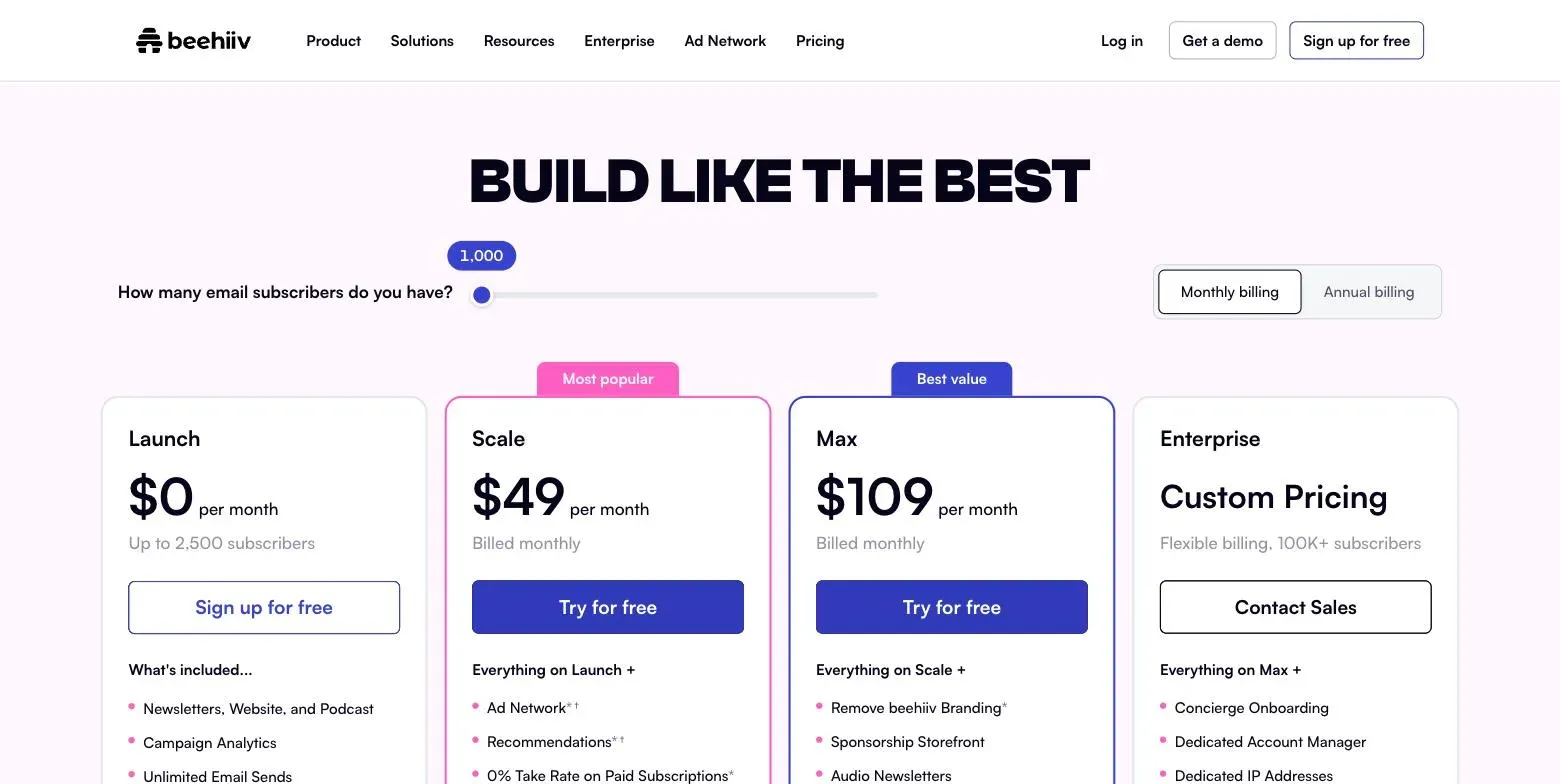
Follow the curve and the picture changes. beehiiv rises 3.4× between 1,000 and 25,000 subscribers, against 9.4× for MailerLite, arriving at $169 — second cheapest at that size, behind only Mailchimp’s stripped-down Essentials. It climbs more gently than anything else here, which is another way of saying its position improves most as you grow.
The product is aimed at a narrower job too: newsletters as a business, with an ad network, paid subscriptions at a 0% take rate on Scale, and a sponsorship storefront on Max. Those are revenue features, worth nothing if you aren’t monetising a newsletter directly and quite a lot if you are. Its free Launch plan covers 2,500 subscribers with unlimited sends, no card.
Strengths: the flattest cost curve in this comparison; the cheapest full-featured plan at 25,000; built around newsletter monetisation rather than generic email marketing; free to 2,500 with unlimited sends.
Weaknesses: the highest entry price, which makes it look wrong on every comparison that stops at 1,000 subscribers; its best features are irrelevant unless the newsletter itself earns money.
Mailchimp: the cheapest numbers, with the most asterisks
Mailchimp posts the lowest figure in this comparison at both ends of the range — $14.33 at 1,000 subscribers on Essentials, $137.06 at 25,000 — which is not what most creators expect from the incumbent everyone assumes is expensive.
Two things are working on you at once, though. The displayed prices are discounted 15% for the first twelve months, with the standard rates underneath in smaller type — those are what you pay in year two. And a footnote says overages apply if you exceed either the contact or the send limit, which makes the headline a floor rather than a bill:
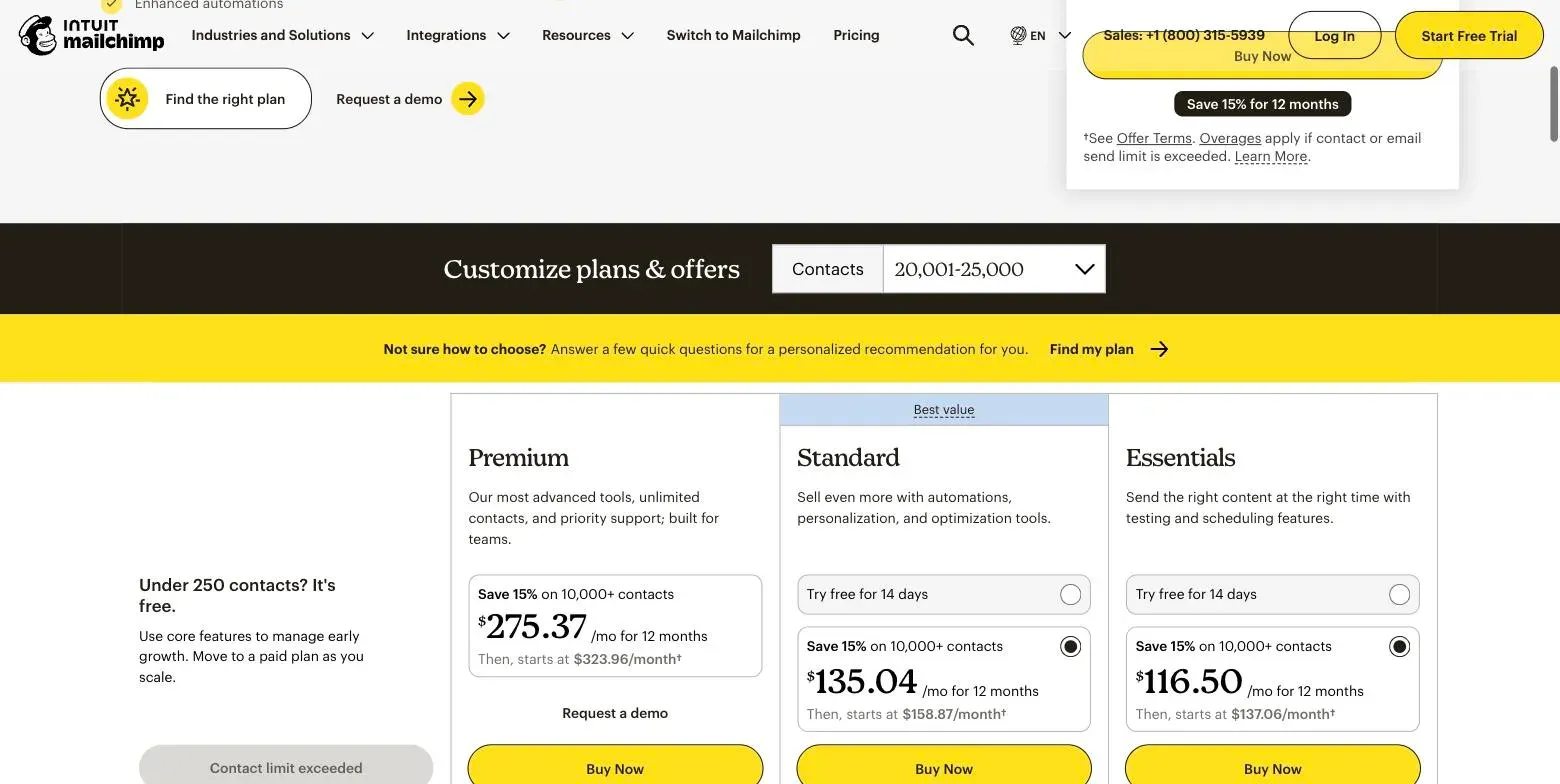
Essentials is also the thinnest plan here in feature terms — automations, the thing most creators actually want email software for, are a Standard feature at $24.30/$53.89/$158.87. Compare Standard rather than Essentials and Mailchimp stops being the cheapest and becomes mid-pack.
Its free plan covers 250 contacts, matching MailerLite for the smallest free tier in this group.
Strengths: the lowest headline price at every list size we checked; enormous integration ecosystem; the default nobody gets fired for choosing.
Weaknesses: the cheap plan omits automation; overage charges make the bill less predictable than the table suggests; the displayed price is a first-year promotional rate.
Brevo: priced on sends, which changes the question
Brevo is the one tool here that doesn’t price on list size at all. Contacts are effectively unlimited; you pay for emails sent. Starter is $9/month and Standard $18/month, both starting from 5,000 emails per month, with Professional at $499 from 150,000:
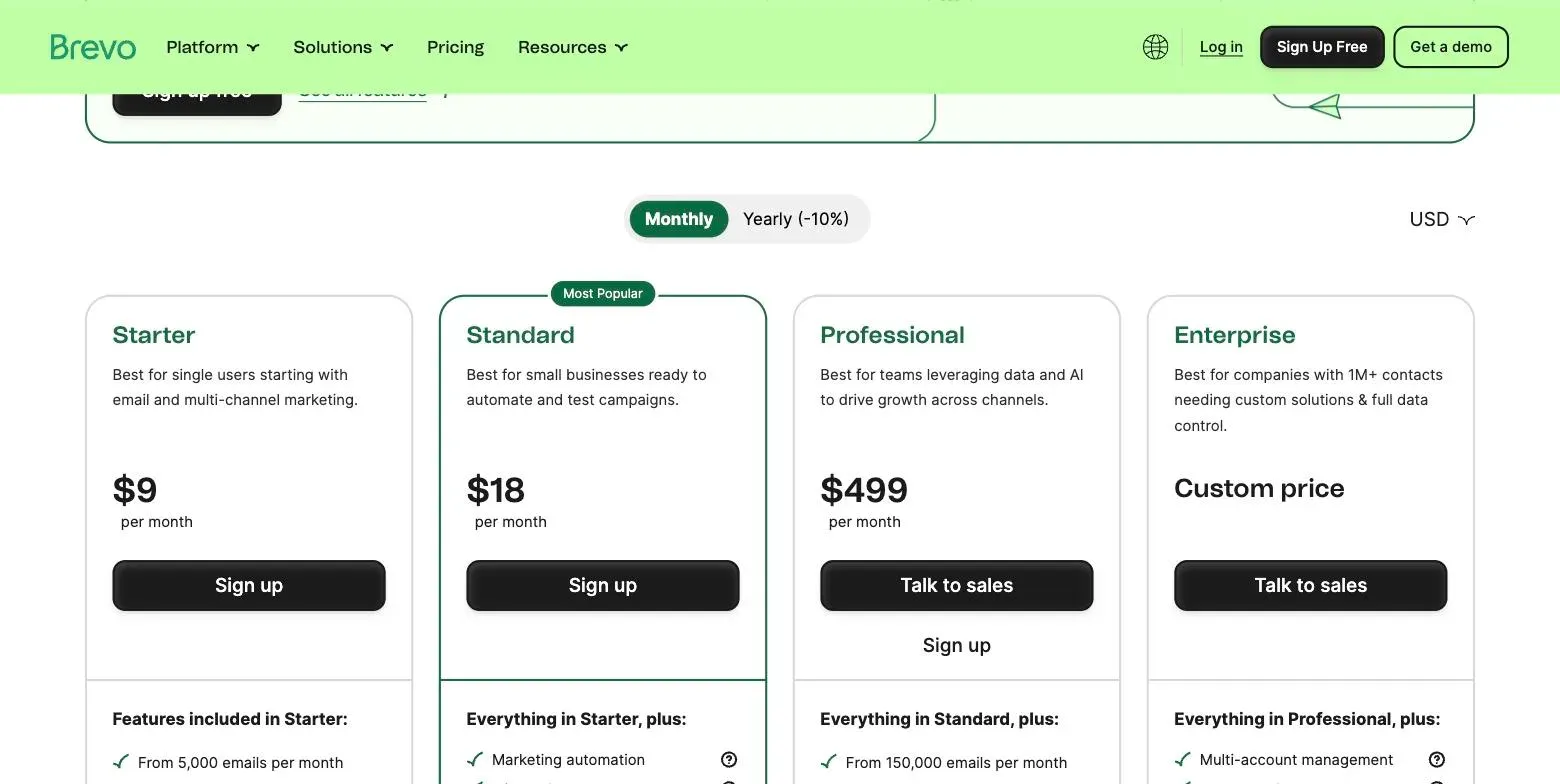
That model rewards a specific shape of business and punishes another. A large list you email rarely is cheap on Brevo and expensive everywhere else. A small list you email daily is the reverse. Multiply your list by how many times a month you actually send: 5,000 subscribers emailed four times is 20,000 sends, and 25,000 subscribers emailed four times is 100,000 — a very different tier from the $9 headline.
The free plan follows the same logic: unlimited contacts with a 300-emails-per-day cap, and no card. We signed up to check, and the account confirms it plainly:
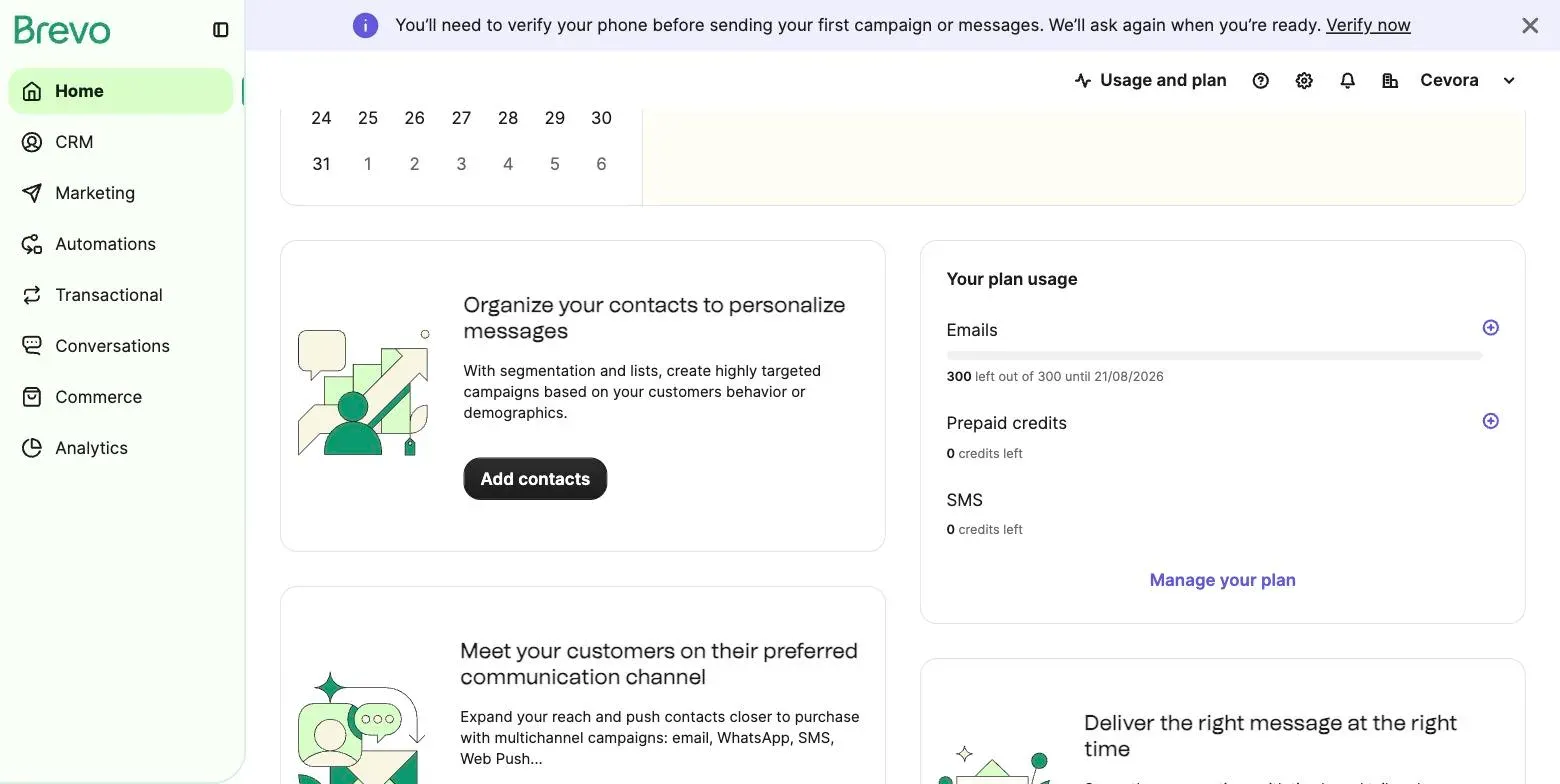
For a creator with a big list and an occasional newsletter, that’s a usable free tier rather than an evaluation one. The catch: Brevo publishes the entry volume and the $499 tier and not much between them, so you can’t model your own send volume before signing up.
Strengths: unlimited contacts; free tier that scales with list size rather than capping it; cheapest option by far for large lists mailed infrequently; no card to start.
Weaknesses: the pricing model makes it hard to compare against everything else; mid-range send volumes aren’t published; frequent senders will find the model works against them.
Which one fits which creator
Under 10,000 subscribers, simple automation needs → Kit, on the free plan. Nothing else comes close on capacity. Paying $49–$179 elsewhere for a list Kit hosts for nothing is hard to justify — just remember to downgrade into it.
Growing fast, or the newsletter is the product → beehiiv. It has the mildest curve here and the revenue features (paid subscriptions at a 0% take rate, ad network) that no general-purpose email tool matches. The entry price is the wrong thing to optimise if you’re confident about growth.
Lowest bill right now, and you’ll re-evaluate → MailerLite. Genuinely the cheapest way to start, with the full feature set on every paid tier. Diary a review at 5,000 subscribers, because the curve steepens after that.
You’d otherwise pay for landing pages and funnels too → GetResponse. Same entry price as MailerLite, more of the stack included. Price the bundle, not the plan.
A big list you email occasionally → Brevo. Nothing else prices on sends, and for a monthly newsletter to a large list that model is dramatically cheaper. Work out your send volume first.
The lowest number on the invoice, automation optional → Mailchimp Essentials. It posts the lowest figure at every list size we checked. Budget the standard rate, not the first-year promotional one, and read the overage terms.
Frequently asked questions
Can I really run a business on a free email plan? On Kit’s, up to 10,000 subscribers, if one basic automation is enough for you — but check that you’re actually on it, because signup starts you on a paid trial. On beehiiv’s, up to 2,500 with unlimited sends. GetResponse’s 500 contacts and MailerLite’s 250 are evaluation tiers rather than operating ones.
Will a free trial here bill me if I forget to cancel? Not on the four we signed up to. None of Kit, MailerLite, GetResponse or Brevo asked for a card, and Kit says explicitly that the subscription cancels at the end of the trial. That is not true of every software category — course platforms in particular will take a card up front and charge it — but in email marketing the downside of leaving a trial running appears to be losing features rather than paying for them.
How much does annual billing save? Roughly 10–18% depending on the vendor, applied to the same list-size tiers — so it shifts every number down proportionally without changing the rankings.
What actually makes switching hard later? Not the list. Automations, forms, landing pages and tag structures are what you rebuild, and none of them export. If you expect to outgrow your first tool, keep the plumbing simple early.
Bottom line
There is no cheapest email tool — only the cheapest one at your list size and sending habit, and the answer moves underneath you as you grow.
Under 10,000 subscribers with modest automation needs, Kit’s free plan is the strongest offer here by a wide margin. Growing fast, beehiiv’s flat curve is worth its awkward entry price. Mailing a large list infrequently, Brevo’s send-based model is in a category of its own. And for the smallest number on the invoice, Mailchimp Essentials posts it — with the most conditions attached.
What none of them deserve is a decision made on the headline price alone. Every tool here lets you start free, and none of the four we signed up to asked for a card. Take the two that fit your situation, import a few hundred subscribers, and send one real broadcast from each before you commit.